在数据展示与管理的场景中,用户往往需要从大量数据中进行跨页选择操作。传统的表格选择功能通常局限于单页,当用户需要对多页数据进行批量操作时,往往需要重复选择,效率低下。本文实现的表格跨页选择功能,能够记住用户在不同页面的选择状态,支持全选、清除、搜索等操作,极大提升了数据操作的便利性。本文将介绍如何使用 HTML、CSS 和 JavaScript 实现表格跨页选择功能。效果演示
该功能实现了完整的表格分页和跨页选择交互。用户可以在不同页面间切换,选择任意页面的行,选择状态会在页面切换时保持。支持全选当前页、清除所有选择、搜索过滤等功能,选中数据会实时显示在页面下方。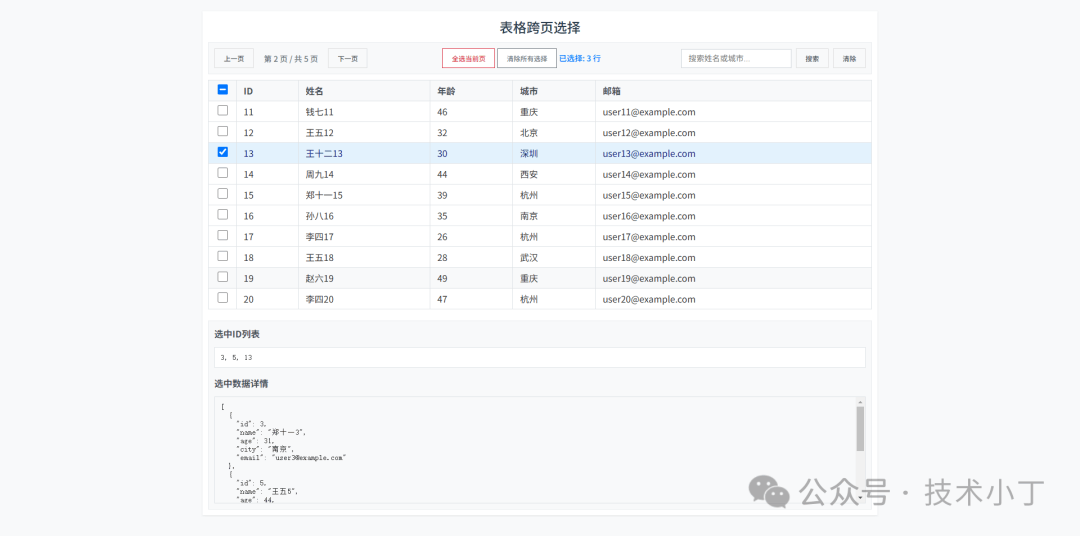
页面结构
页面主要包括四个区域:控制区域、表格区域和数据显示区域。
控制区域
<div class="controls"> <div class="pagination"> <button id="prevPage" onclick="prevPage()">上一页</button> <span class="page-info">第 <span id="currentPage">1</span> 页 / 共 <span id="totalPages">1</span> 页</span> <button id="nextPage" onclick="nextPage()">下一页</button> </div> <div class="selection-controls"> <button id="selectAll" onclick="selectAllCurrentPage()">全选当前页</button> <button id="clearSelection" onclick="clearAllSelection()">清除所有选择</button> <span class="selected-info">已选择: <span id="selectedCount">0</span> 行</span> </div> <div class="search-controls"> <input type="text" id="searchInput" placeholder="搜索姓名或城市..." oninput="handleSearchInput()"> <button id="searchBtn" onclick="performSearch()">搜索</button> <button id="clearSearchBtn" onclick="clearSearch()">清除</button> </div></div>
表格区域
<table id="dataTable"> <thead> <tr> <th class="checkbox-cell"> <input type="checkbox" id="masterCheckbox" onchange="toggleMasterCheckbox(this.checked)"> </th> <th>ID</th> <th>姓名</th> <th>年龄</th> <th>城市</th> <th>邮箱</th> </tr> </thead> <tbody id="tableBody" onclick="handleRowClick(event)"></tbody></table>
数据显示区域
<div class="selected-data"> <h3>选中ID列表</h3> <div class="selected-ids" id="selectedIds">暂无选中项</div> <h3>选中数据详情</h3> <div class="json-display" id="selectedJsonDisplay">暂无选中数据</div></div>
核心功能实现
数据状态管理
使用 Set 对象管理选中的项目,实现跨页数据持久化。全局变量 allData 存储全部数据,filteredData 存储过滤后的数据,selectedItems 保存选中项。let allData = [];let filteredData = [];let selectedItems = new Set();
表格渲染与选中状态同步
renderTable 函数根据当前页数据和选中状态更新表格显示,确保选中状态在翻页后保持不变。function renderTable() { const tbody = document.getElementById('tableBody'); const startIndex = (currentPage - 1) * perPage; const endIndex = startIndex + perPage; const currentPageData = filteredData.slice(startIndex, endIndex);
tbody.innerHTML = ''; currentPageData.forEach(item => { const row = document.createElement('tr'); const isSelected = selectedItems.has(item.id); if (isSelected) row.classList.add('selected'); row.innerHTML = `<td class="checkbox-cell"> <input type="checkbox" ${isSelected ? 'checked' : ''} data-id="${item.id}"> </td> <td>${item.id}</td> <td>${item.name}</td> <td>${item.age}</td> <td>${item.city}</td> <td>${item.email}</td>`; tbody.appendChild(row); }); updateMasterCheckbox();}
行选择与状态更新
toggleRowSelection 函数处理单行选择,更新 selectedItems 集合和 UI 状态,同时更新主复选框状态。function toggleRowSelection(row, checked) { const id = parseInt(row.querySelector('input[type="checkbox"]').dataset.id); if (checked) { selectedItems.add(id); row.classList.add('selected'); } else { selectedItems.delete(id); row.classList.remove('selected'); } updateMasterCheckbox(); updateSelectedCount(); updateSelectedDataDisplay();}
主选择框同步逻辑
updateMasterCheckbox 函数实现主选择框与当前页数据的同步,包括全选、部分选中和未选中状态的处理。function updateMasterCheckbox() { const masterCheckbox = document.getElementById('masterCheckbox'); const currentPageData = getCurrentPageData(); if (currentPageData.length === 0) { masterCheckbox.checked = false; masterCheckbox.indeterminate = false; return; } const selectedOnCurrentPage = currentPageData.filter(item => selectedItems.has(item.id)); if (selectedOnCurrentPage.length === 0) { masterCheckbox.checked = false; masterCheckbox.indeterminate = false; } else if (selectedOnCurrentPage.length === currentPageData.length) { masterCheckbox.checked = true; masterCheckbox.indeterminate = false; } else { masterCheckbox.checked = false; masterCheckbox.indeterminate = true; }}
完整代码
git地址:https://gitee.com/ironpro/hjdemo/blob/master/table-select/index.html<!DOCTYPE html><html lang="zh-CN"><head> <meta charset="utf-8"> <meta name="viewport" content="width=device-width, initial-scale=1.0"> <title>表格跨页选择</title> <style> * { margin: 0; padding: 0; box-sizing: border-box; } body { background-color: #f8f9fa; padding: 20px; min-height: 100vh; color: #333; } .container { max-width: 1200px; margin: 0 auto; background: #fff; padding: 10px; box-shadow: 0 1px 3px rgba(0, 0, 0, 0.1); } h1 { color: #2c3e50; margin-bottom: 10px; text-align: center; font-weight: 500; font-size: 24px; } .controls { display: flex; justify-content: space-between; align-items: center; margin-bottom: 10px; padding: 10px; background: #f8f9fa; flex-wrap: wrap; gap: 10px; border: 1px solid #e9ecef; } .pagination { display: flex; gap: 8px; align-items: center; } button { padding: 8px 16px; border: 1px solid #ddd; color: #495057; cursor: pointer; font-size: 14px; font-weight: 500; transition: all 0.2s; background-color: #f8f9fa; } button:hover { background: #e9ecef; border-color: #adb5bd; } button:disabled { background: #f8f9fa; color: #adb5bd; cursor: not-allowed; border-color: #e9ecef; } #selectAll { background: #fff; color: #dc3545; border-color: #dc3545; } #selectAll:hover { background: #dc3545; color: #fff; } #clearSelection { background: #fff; color: #6c757d; border-color: #6c757d; } #clearSelection:hover { background: #6c757d; color: #fff; } .page-info { font-weight: 500; color: #6c757d; font-size: 14px; margin: 0 10px; } .selected-info { color: #007bff; font-weight: 500; font-size: 14px; } table { width: 100%; border-collapse: collapse; margin-bottom: 20px; border: 1px solid #dee2e6; } th, td { padding: 6px 14px; text-align: left; border-bottom: 1px solid #dee2e6; border-right: 1px solid #dee2e6; } th { background: #f8f9fa; font-weight: 600; color: #495057; position: sticky; top: 0; z-index: 10; } th:last-child, td:last-child { border-right: none; } tr:hover { background: #f8f9fa; } tr.selected { background: #e3f2fd !important; } tr.selected td { color: #1a237e; } .checkbox-cell { width: 50px; text-align: center; } input[type="checkbox"] { width: 18px; height: 18px; cursor: pointer; } .selected-data { background: #f8f9fa; padding: 10px; border: 1px solid #e9ecef; max-height: 340px; overflow-y: auto; } .selected-data h3 { color: #495057; margin-bottom: 14px; font-size: 16px; font-weight: 600; } .selected-ids { margin-bottom: 15px; padding: 10px; background: #fff; border: 1px solid #dee2e6; font-family: monospace; white-space: pre-wrap; word-break: break-all; } .json-display { background: #f8f9fa; padding: 10px; border: 1px solid #dee2e6; font-family: monospace; white-space: pre-wrap; word-break: break-all; max-height: 190px; overflow-y: auto; } input[type="text"] { padding: 8px 14px; border: 1px solid #ced4da; margin-left: 10px; font-size: 14px; } input[type="text"]:focus { outline: none; border-color: #007bff; } .search-controls { display: flex; align-items: center; gap: 8px; } </style></head><body><div class="container"> <h1>表格跨页选择</h1> <div class="controls"> <div class="pagination"> <button id="prevPage" onclick="prevPage()">上一页</button> <span class="page-info">第 <span id="currentPage">1</span> 页 / 共 <span id="totalPages">1</span> 页</span> <button id="nextPage" onclick="nextPage()">下一页</button> </div> <div class="selection-controls"> <button id="selectAll" onclick="selectAllCurrentPage()">全选当前页</button> <button id="clearSelection" onclick="clearAllSelection()">清除所有选择</button> <span class="selected-info">已选择: <span id="selectedCount">0</span> 行</span> </div> <div class="search-controls"> <input type="text" id="searchInput" placeholder="搜索姓名或城市..." oninput="handleSearchInput()"> <button id="searchBtn" onclick="performSearch()">搜索</button> <button id="clearSearchBtn" onclick="clearSearch()">清除</button> </div> </div> <table id="dataTable"> <thead> <tr> <th class="checkbox-cell"> <input type="checkbox" id="masterCheckbox" onchange="toggleMasterCheckbox(this.checked)"> </th> <th>ID</th> <th>姓名</th> <th>年龄</th> <th>城市</th> <th>邮箱</th> </tr> </thead> <tbody id="tableBody" onclick="handleRowClick(event)"></tbody> </table> <div class="selected-data"> <h3>选中ID列表</h3> <div class="selected-ids" id="selectedIds">暂无选中项</div> <h3>选中数据详情</h3> <div class="json-display" id="selectedJsonDisplay">暂无选中数据</div> </div></div><script> let currentPage = 1; let perPage = 10; let searchTerm = ''; let totalPages = 0; let searchTimeout; let allData = []; let filteredData = []; let selectedItems = new Set();
function generateMockData(count) { const names = ['张三', '李四', '王五', '赵六', '钱七', '孙八', '周九', '吴十', '郑十一', '王十二']; const cities = ['北京', '上海', '广州', '深圳', '杭州', '南京', '武汉', '成都', '西安', '重庆']; const data = []; for (let i = 1; i <= count; i++) { data.push({ id: i, name: names[Math.floor(Math.random() * names.length)] + i, age: Math.floor(Math.random() * 30) + 20, city: cities[Math.floor(Math.random() * cities.length)], email: `user${i}@example.com` }); } return data; }
function init() { allData = generateMockData(50); filteredData = [...allData]; totalPages = Math.ceil(filteredData.length / perPage); render(); updateSelectedDataDisplay(); }
function handleRowClick(event) { if (event.target.tagName === 'INPUT' && event.target.type === 'checkbox') { toggleRowSelection(event.target.closest('tr'), event.target.checked); } else if (event.target.tagName !== 'LABEL') { const row = event.target.closest('tr'); if (row) { const checkbox = row.querySelector('input[type="checkbox"]'); checkbox.checked = !checkbox.checked; toggleRowSelection(row, checkbox.checked); } } }
function handleSearchInput() { clearTimeout(searchTimeout); searchTimeout = setTimeout(() => { searchTerm = document.getElementById('searchInput').value.trim().toLowerCase(); performSearch(); }, 300); }
function performSearch() { if (searchTerm) { filteredData = allData.filter(item => item.name.toLowerCase().includes(searchTerm) || item.city.toLowerCase().includes(searchTerm) ); } else { filteredData = [...allData]; } totalPages = Math.ceil(filteredData.length / perPage); currentPage = 1; render(); }
function clearSearch() { document.getElementById('searchInput').value = ''; searchTerm = ''; filteredData = [...allData]; totalPages = Math.ceil(filteredData.length / perPage); currentPage = 1; render(); updateSelectedDataDisplay(); }
function render() { renderTable(); renderPagination(); }
function renderTable() { const tbody = document.getElementById('tableBody'); const startIndex = (currentPage - 1) * perPage; const endIndex = startIndex + perPage; const currentPageData = filteredData.slice(startIndex, endIndex);
tbody.innerHTML = ''; currentPageData.forEach(item => { const row = document.createElement('tr'); const isSelected = selectedItems.has(item.id); if (isSelected) row.classList.add('selected'); row.innerHTML = `<td class="checkbox-cell"> <input type="checkbox" ${isSelected ? 'checked' : ''} data-id="${item.id}"> </td> <td>${item.id}</td> <td>${item.name}</td> <td>${item.age}</td> <td>${item.city}</td> <td>${item.email}</td>`; tbody.appendChild(row); }); updateMasterCheckbox(); }
function renderPagination() { document.getElementById('currentPage').textContent = currentPage; document.getElementById('totalPages').textContent = totalPages; document.getElementById('prevPage').disabled = currentPage === 1; document.getElementById('nextPage').disabled = currentPage === totalPages; }
function updateMasterCheckbox() { const masterCheckbox = document.getElementById('masterCheckbox'); const currentPageData = getCurrentPageData(); if (currentPageData.length === 0) { masterCheckbox.checked = false; masterCheckbox.indeterminate = false; return; } const selectedOnCurrentPage = currentPageData.filter(item => selectedItems.has(item.id)); if (selectedOnCurrentPage.length === 0) { masterCheckbox.checked = false; masterCheckbox.indeterminate = false; } else if (selectedOnCurrentPage.length === currentPageData.length) { masterCheckbox.checked = true; masterCheckbox.indeterminate = false; } else { masterCheckbox.checked = false; masterCheckbox.indeterminate = true; } }
function toggleMasterCheckbox(checked) { const currentPageData = getCurrentPageData(); currentPageData.forEach(item => { if (checked) selectedItems.add(item.id); else selectedItems.delete(item.id); }); renderTable(); updateSelectedCount(); updateSelectedDataDisplay(); }
function toggleRowSelection(row, checked) { const id = parseInt(row.querySelector('input[type="checkbox"]').dataset.id); if (checked) { selectedItems.add(id); row.classList.add('selected'); } else { selectedItems.delete(id); row.classList.remove('selected'); } updateMasterCheckbox(); updateSelectedCount(); updateSelectedDataDisplay(); }
function getCurrentPageData() { const startIndex = (currentPage - 1) * perPage; const endIndex = startIndex + perPage; return filteredData.slice(startIndex, endIndex); }
function updateSelectedCount() { document.getElementById('selectedCount').textContent = selectedItems.size; }
function prevPage() { if (currentPage > 1) { currentPage--; render(); } }
function nextPage() { if (currentPage < totalPages) { currentPage++; render(); } }
function selectAllCurrentPage() { const currentPageData = getCurrentPageData(); currentPageData.forEach(item => selectedItems.add(item.id)); render(); updateSelectedCount(); updateSelectedDataDisplay(); }
function clearAllSelection() { selectedItems.clear(); render(); updateSelectedCount(); updateSelectedDataDisplay(); }
function updateSelectedDataDisplay() { const selectedIdsElement = document.getElementById('selectedIds'); const selectedJsonDisplay = document.getElementById('selectedJsonDisplay'); if (selectedItems.size === 0) { selectedIdsElement.textContent = '暂无选中项'; selectedJsonDisplay.textContent = '暂无选中数据'; return; } const selectedIds = Array.from(selectedItems).sort((a, b) => a - b); selectedIdsElement.textContent = selectedIds.join(', '); const selectedData = allData.filter(item => selectedItems.has(item.id)); selectedJsonDisplay.textContent = JSON.stringify(selectedData, null, 2); }
init();</script></body></html>
阅读原文:https://mp.weixin.qq.com/s/zcVKx0RJuTrIo_EjDfc5Vg
该文章在 2026/1/4 18:41:41 编辑过





 400 186 1886