在 Web 开发中,弹窗组件是用户交互的重要元素。普通的弹窗往往只能固定位置,用户体验受限。一个可拖拽且支持调整大小的弹窗能够显著提升用户的操作自由度,特别是在多窗口工作环境中,用户可以将弹窗移动到最适合的位置,避免遮挡重要信息。这种设计不仅提升了界面的灵活性,还增强了用户的控制感。本文将介绍如何使用 HTML、CSS 和 JavaScript 实现可拖拽弹窗。效果演示
这个可拖拽弹窗具有完整的交互功能。用户点击"打开弹窗"按钮后,弹窗会在屏幕中央显示。弹窗的标题栏支持拖拽移动,用户可以将弹窗拖到任意位置。右下角的调整手柄允许用户改变弹窗大小。弹窗会限制在视窗范围内,不会拖出屏幕边界。关闭按钮可以隐藏弹窗。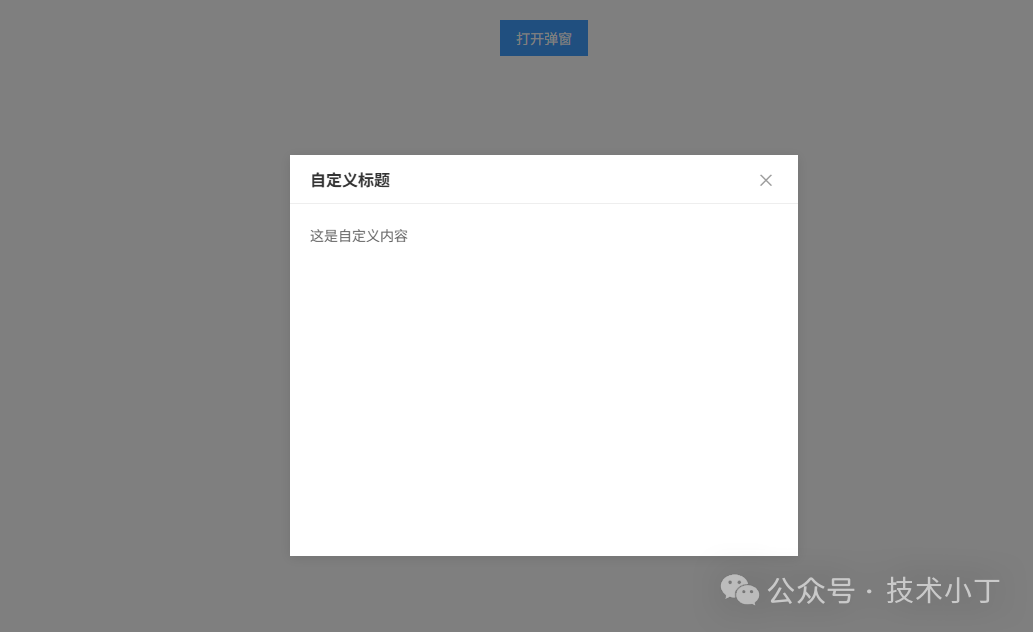
页面结构
本弹窗组件主要包含遮罩层、标题栏、内容区和调整手柄,相关元素都由 js 生成,最终结构如下。<div class="modal-mask"> <div class="modal-container"> <div class="modal-header"> <div class="modal-title">弹窗标题</div> <div class="modal-close">×</div> </div> <div class="modal-body">弹窗内容</div> <div class="modal-resizer"></div> </div></div>
核心功能实现
弹窗类结构设计
使用 DraggableModal 类封装弹窗功能。构造函数初始化默认配置和状态变量,包括拖拽和调整大小的标识符。通过 options 对象存储配置项,支持自定义标题、内容、尺寸等属性。class DraggableModal { constructor(options = {}) { this.options = { maskClose: false, minWidth: 300, minHeight: 200, maxWidthRatio: 1.0, maxHeightRatio: 1.0, title: '弹窗标题', content: '', width: 500, height: 'auto', ...options }; this.isDragging = false; this.isResizing = false;
this.createElements(); this.bindEvents(); }}
DOM 元素创建与初始化
createElements 方法动态创建弹窗所需的 DOM 元素,包括遮罩层、容器、标题栏、内容区和调整手柄。通过模板字符串设置 HTML 内容,并保存各个元素的引用以便后续操作。将创建的元素添加到文档中,完成初始渲染。createElements() { this.mask = document.createElement('div'); this.mask.className = 'modal-mask'; this.container = document.createElement('div'); this.container.className = 'modal-container'; this.container.style.width = `${this.options.width}px`; if (this.options.height !== 'auto') { this.container.style.height = `${this.options.height}px`; } this.container.innerHTML = `<div class="modal-header"> <div class="modal-title">${this.options.title}</div> <div class="modal-close">×</div> </div> <div class="modal-body">${this.options.content}</div> <div class="modal-resizer"></div>`; this.header = this.container.querySelector('.modal-header'); this.title = this.container.querySelector('.modal-title'); this.closeButton = this.container.querySelector('.modal-close'); this.body = this.container.querySelector('.modal-body'); this.resizer = this.container.querySelector('.modal-resizer');
this.mask.appendChild(this.container); document.body.appendChild(this.mask);}
拖拽功能实现
拖拽功能通过鼠标事件实现。在标题栏的 mousedown 事件中记录初始位置和鼠标坐标,设置拖拽状态为 true。在 mousemove 事件中计算鼠标移动距离,更新弹窗位置,同时限制弹窗在视窗范围内。mouseup 事件结束拖拽操作。startDragging(e) { e.preventDefault(); this.isDragging = true; this.isResizing = false;
const rect = this.container.getBoundingClientRect(); this.dragStartX = e.clientX; this.dragStartY = e.clientY; this.initialLeft = rect.left; this.initialTop = rect.top;
this.container.style.cursor = 'grabbing';}
drag(e) {  if (!this.isDragging) return;
  const deltaX = e.clientX - this.dragStartX;  const deltaY = e.clientY - this.dragStartY;  const maxLeft = window.innerWidth - this.container.offsetWidth;  const maxTop = window.innerHeight - this.container.offsetHeight;  const newLeft = Math.max(0, Math.min(this.initialLeft + deltaX, maxLeft));  const newTop = Math.max(0, Math.min(this.initialTop + deltaY, maxTop));
  this.container.style.left = `${newLeft}px`;  this.container.style.top = `${newTop}px`;}
调整大小功能实现
调整大小功能通过右下角的调整手柄实现。在 resizer 的 mousedown 事件中记录初始尺寸和鼠标坐标,设置调整状态为 true。在 mousemove 事件中根据鼠标移动距离调整弹窗宽度和高度,同时确保尺寸在合理范围内。startResizing(e) { e.preventDefault(); this.isResizing = true; this.isDragging = false;
const rect = this.container.getBoundingClientRect(); this.resizeStartX = e.clientX; this.resizeStartY = e.clientY; this.initialWidth = rect.width; this.initialHeight = rect.height;
this.container.style.cursor = 'se-resize';}
resize(e) {  if (!this.isResizing) return;
  const deltaX = e.clientX - this.resizeStartX;  const deltaY = e.clientY - this.resizeStartY;  const maxWidth = window.innerWidth * this.options.maxWidthRatio;  const maxHeight = window.innerHeight * this.options.maxHeightRatio;  const newWidth = Math.max(this.options.minWidth, Math.min(this.initialWidth + deltaX, maxWidth));  const newHeight = Math.max(this.options.minHeight, Math.min(this.initialHeight + deltaY, maxHeight));
  this.container.style.width = `${newWidth}px`;  this.container.style.height = `${newHeight}px`;}
完整代码
git地址:https://gitee.com/ironpro/hjdemo/blob/master/modal-draggable/index.html<!DOCTYPE html><html lang="zh-CN"><head> <meta charset="utf-8"> <meta name="viewport" content="width=device-width, initial-scale=1.0"> <title>可拖拽弹窗</title> <style> * { margin: 0; padding: 0; box-sizing: border-box; } body { padding: 20px; display: flex; justify-content: center; } .modal-mask { position: fixed; top: 0; left: 0; width: 100vw; height: 100vh; background: rgba(0, 0, 0, 0.5); display: none; z-index: 999; } .modal-container { width: 500px; min-width: 300px; min-height: 200px; background: #fff; box-shadow: 0 2px 14px rgba(0, 0, 0, 0.1); position: absolute; cursor: default; user-select: none; overflow: hidden; display: flex; flex-direction: column; } .modal-header { padding: 14px 20px; border-bottom: 1px solid #eee; display: flex; justify-content: space-between; align-items: center; cursor: move; flex-shrink: 0; } .modal-title { font-size: 16px; font-weight: 600; color: #333; } .modal-close { width: 24px; height: 24px; line-height: 24px; text-align: center; border-radius: 50%; cursor: pointer; font-size: 18px; color: #999; transition: all 0.2s; } .modal-body { padding: 20px; font-size: 14px; color: #666; line-height: 1.6; flex: 1; overflow-y: auto; scrollbar-width: thin; scrollbar-color: #409eff #eee; user-select: text; } .modal-body::-webkit-scrollbar { width: 6px; } .modal-body::-webkit-scrollbar-track { background: #eee; border-radius: 3px; } .modal-body::-webkit-scrollbar-thumb { background: #c1c1c1; border-radius: 3px; } .modal-resizer { width: 15px; height: 15px; position: absolute; right: 0; bottom: 0; cursor: se-resize; opacity: 0; z-index: 10; } .open-modal-btn { padding: 8px 16px; background: #409eff; color: #fff; border: none; cursor: pointer; font-size: 14px; transition: background 0.2s; } .open-modal-btn:hover { background: #66b1ff; } </style></head><body><button class="open-modal-btn" id="openBtn">打开弹窗</button>
<script> class DraggableModal { constructor(options = {}) { this.options = { maskClose: false, minWidth: 300, minHeight: 200, maxWidthRatio: 1.0, maxHeightRatio: 1.0, title: '弹窗标题', content: '', width: 500, height: 'auto', ...options }; this.isDragging = false; this.isResizing = false;
this.createElements(); this.bindEvents(); }
createElements() { this.mask = document.createElement('div'); this.mask.className = 'modal-mask'; this.container = document.createElement('div'); this.container.className = 'modal-container'; this.container.style.width = `${this.options.width}px`; if (this.options.height !== 'auto') { this.container.style.height = `${this.options.height}px`; } this.container.innerHTML = `<div class="modal-header"> <div class="modal-title">${this.options.title}</div> <div class="modal-close">×</div> </div> <div class="modal-body">${this.options.content}</div> <div class="modal-resizer"></div>`; this.header = this.container.querySelector('.modal-header'); this.title = this.container.querySelector('.modal-title'); this.closeButton = this.container.querySelector('.modal-close'); this.body = this.container.querySelector('.modal-body'); this.resizer = this.container.querySelector('.modal-resizer');
this.mask.appendChild(this.container); document.body.appendChild(this.mask); }
bindEvents() { this.closeButton.addEventListener('click', () => this.hide()); this.mask.addEventListener('click', (e) => { if (e.target === this.mask && this.options.maskClose) { this.hide(); } }); this.header.addEventListener('mousedown', this.startDragging.bind(this)); this.resizer.addEventListener('mousedown', this.startResizing.bind(this)); document.addEventListener('mousemove', this.handleMouseMove.bind(this)); document.addEventListener('mouseup', this.stopAction.bind(this)); window.addEventListener('resize', this.centerModal.bind(this)); }
startDragging(e) { e.preventDefault(); this.isDragging = true; this.isResizing = false;
const rect = this.container.getBoundingClientRect(); this.dragStartX = e.clientX; this.dragStartY = e.clientY; this.initialLeft = rect.left; this.initialTop = rect.top;
this.container.style.cursor = 'grabbing'; }
startResizing(e) { e.preventDefault(); this.isResizing = true; this.isDragging = false;
const rect = this.container.getBoundingClientRect(); this.resizeStartX = e.clientX; this.resizeStartY = e.clientY; this.initialWidth = rect.width; this.initialHeight = rect.height;
this.container.style.cursor = 'se-resize'; }
handleMouseMove(e) { if (this.isDragging) { this.drag(e); } else if (this.isResizing) { this.resize(e); } }
drag(e) { if (!this.isDragging) return;
const deltaX = e.clientX - this.dragStartX; const deltaY = e.clientY - this.dragStartY; const maxLeft = window.innerWidth - this.container.offsetWidth; const maxTop = window.innerHeight - this.container.offsetHeight; const newLeft = Math.max(0, Math.min(this.initialLeft + deltaX, maxLeft)); const newTop = Math.max(0, Math.min(this.initialTop + deltaY, maxTop));
this.container.style.left = `${newLeft}px`; this.container.style.top = `${newTop}px`; }
resize(e) { if (!this.isResizing) return;
const deltaX = e.clientX - this.resizeStartX; const deltaY = e.clientY - this.resizeStartY; const maxWidth = window.innerWidth * this.options.maxWidthRatio; const maxHeight = window.innerHeight * this.options.maxHeightRatio; const newWidth = Math.max(this.options.minWidth, Math.min(this.initialWidth + deltaX, maxWidth)); const newHeight = Math.max(this.options.minHeight, Math.min(this.initialHeight + deltaY, maxHeight));
this.container.style.width = `${newWidth}px`; this.container.style.height = `${newHeight}px`; }
stopAction() { this.isDragging = false; this.isResizing = false; this.container.style.cursor = 'default'; }
updateContent(content, title = null) { this.body.innerHTML = content; if (title) this.title.textContent = title; }
show(config = {}) { this.options = { ...this.options, ...config };
if (config.content) { this.updateContent(config.content, config.title); } else if (config.title) { this.title.textContent = config.title; }
this.mask.style.display = 'flex'; this.centerModal(); }
hide() { this.mask.style.display = 'none'; }
centerModal() { const rect = this.container.getBoundingClientRect(); const maxWidth = window.innerWidth * 0.8; const maxHeight = window.innerHeight * 0.8; const finalWidth = Math.min(rect.width, maxWidth); const finalHeight = Math.min(rect.height, maxHeight); const left = (window.innerWidth - finalWidth) / 2; const top = (window.innerHeight - finalHeight) / 2;
this.container.style.width = `${finalWidth}px`; this.container.style.height = `${finalHeight}px`; this.container.style.left = `${left}px`; this.container.style.top = `${top}px`; } } const modal = new DraggableModal(); document.getElementById('openBtn').addEventListener('click', () => { modal.show({ title: '自定义标题', content: '<p>这是自定义内容</p>', }); });</script></body></html>
阅读原文:原文链接
该文章在 2026/1/8 9:22:03 编辑过






 400 186 1886