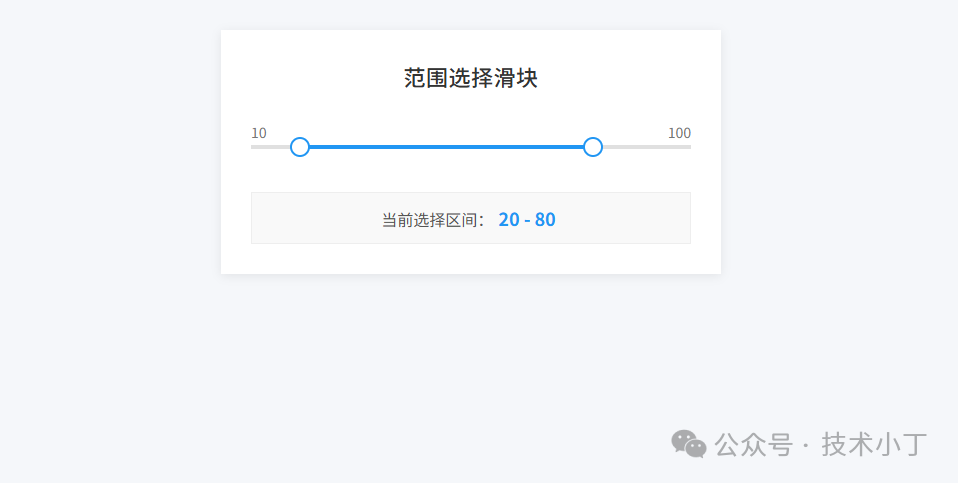
范围选择滑块组件为用户提供了直观的方式来进行数值范围的选择,相比于传统的输入框,它具有更好的用户体验和视觉反馈。特别适用于价格筛选、时间范围设置等场景。本文将介绍如何使用 HTML、CSS 和 JavaScript 实现一个可拖拽的范围选择滑块。效果演示
这个范围选择滑块支持双滑块操作,用户可以通过拖动左侧滑块调整最小值,拖动右侧滑块调整最大值。同时支持点击轨道空白区域,滑块会自动跳转到最近的位置。滑块具有平滑的视觉反馈,拖动时会有放大效果,并显示当前选择的具体数值范围。
页面结构
页面主要包括滑块轨道和数值显示两个区域。滑块轨道显示滑块的整体轨迹和已选范围,数值显示显示当前选择的数值范围。<div class="slider-container"> <div class="slider-track" id="sliderTrack"></div> <div class="slider-range" id="sliderRange"></div> <div class="slider-thumb" id="minThumb"></div> <div class="slider-thumb" id="maxThumb"></div> <div class="slider-labels"> <span id="minLabel">10</span> <span id="maxLabel">100</span> </div></div>
<div class="value-display"> 当前选择区间:<span class="range-value" id="rangeValue">20 - 80</span></div>
核心功能实现
配置初始化
首先定义滑块的基础配置,包括最小值、最大值、当前选择值和步长。这些配置参数决定了滑块的行为特性。const config = { minValue: 10, maxValue: 100, currentMin: 20, currentMax: 80, step: 1};
let isDragging = null;
位置更新逻辑
updateSlider 函数负责根据当前数值计算滑块的位置,并更新视觉表现。它通过百分比计算滑块的 left 值,确保滑块位置与数值对应。function updateSlider() { const minPercent = ((config.currentMin - config.minValue) / (config.maxValue - config.minValue)) * 100; const maxPercent = ((config.currentMax - config.minValue) / (config.maxValue - config.minValue)) * 100;
minThumb.style.left = minPercent + '%'; maxThumb.style.left = maxPercent + '%'; sliderRange.style.left = minPercent + '%'; sliderRange.style.width = (maxPercent - minPercent) + '%';
rangeValue.textContent = `${config.currentMin} - ${config.currentMax}`; minLabel.textContent = config.minValue; maxLabel.textContent = config.maxValue;}
拖拽事件处理
handleDrag 函数是拖拽的核心处理逻辑,它获取鼠标或触摸位置,转换为对应的数值,并根据当前拖拽的是最小值还是最大值滑块来更新配置。function handleDrag(e) { if (!isDragging) return;
e.preventDefault(); const rect = sliderTrack.getBoundingClientRect(); const position = Math.max(0, Math.min(rect.width, getEventClientX(e) - rect.left)); const percentage = position / rect.width; let value = Math.round( (config.minValue + percentage * (config.maxValue - config.minValue) - config.minValue) / config.step ) * config.step + config.minValue;
value = Math.max(config.minValue, Math.min(config.maxValue, value));
if (isDragging === minThumb) { config.currentMin = Math.min(value, config.currentMax); } else { config.currentMax = Math.max(value, config.currentMin); }
updateSlide();}
事件绑定机制
通过 addEventListener 方法为滑块添加鼠标和触摸事件监听,实现跨设备兼容。同时在全局注册移动和释放事件,确保拖拽过程的连续性。minThumb.addEventListener('mousedown', function(e) {startDrag(e, minThumb);});minThumb.addEventListener('touchstart', function(e) {startDrag(e, minThumb);});maxThumb.addEventListener('mousedown', function(e) {startDrag(e, maxThumb);});maxThumb.addEventListener('touchstart', function(e) {startDrag(e, maxThumb);});sliderTrack.addEventListener('click', trackClick);document.addEventListener('mousemove', handleDrag);document.addEventListener('mouseup', endDrag);document.addEventListener('touchmove', handleDrag, { passive: false });document.addEventListener('touchend', endDrag);
扩展建议
添加键盘支持,让用户能用方向键微调数值
支持自定义颜色主题,满足不同界面设计需求
增加数值输入框,方便精确数值输入
完整代码
git地址:https://gitee.com/ironpro/hjdemo/blob/master/select-range/index.html<!DOCTYPE html><html lang="zh-CN"><head> <meta charset="utf-8"> <meta name="viewport" content="width=device-width, initial-scale=1.0"> <title>范围选择滑块</title> <style> * {margin: 0; padding: 0; box-sizing: border-box;} body {background-color: #f5f7fa; padding: 30px; min-height: 100vh; display: flex; flex-direction: column; align-items: center; color: #444;} .container {background: white; padding: 30px; width: 500px; margin-bottom: 30px; box-shadow: 0 2px 10px rgba(0, 0, 0, 0.08);} h1 {text-align: center; color: #333; margin-bottom: 30px; font-size: 22px; font-weight: 500; letter-spacing: 0.5px;} .slider-container {position: relative; height: 50px;} .slider-track {position: absolute; top: 50%; transform: translateY(-50%); width: 100%; height: 4px; background: #e0e0e0; cursor: pointer;} .slider-range {position: absolute; top: 50%; transform: translateY(-50%); height: 4px; background: #2196F3;} .slider-thumb {position: absolute; top: 50%; transform: translate(-50%, -50%); width: 20px; height: 20px; background: white; border: 2px solid #2196F3; border-radius: 50%; cursor: grab; z-index: 10;} .slider-thumb:hover {border-color: #0d8aee;} .slider-thumb.dragging {cursor: grabbing; transform: translate(-50%, -50%) scale(1.2); box-shadow: 0 0 0 4px rgba(33, 150, 243, 0.2);} .slider-labels {display: flex; justify-content: space-between; width: 100%; color: #777; font-size: 14px;} .value-display {text-align: center; margin-top: 20px; font-size: 16px; color: #555; padding: 14px; background: #f9f9f9; border: 1px solid #eee;} .range-value {font-size: 18px; font-weight: 600; color: #2196F3; margin: 0 5px;} </style></head><body><div class="container"> <h1>范围选择滑块</h1> <div class="slider-container"> <div class="slider-track" id="sliderTrack"></div> <div class="slider-range" id="sliderRange"></div> <div class="slider-thumb" id="minThumb"></div> <div class="slider-thumb" id="maxThumb"></div> <div class="slider-labels"> <span id="minLabel">10</span> <span id="maxLabel">100</span> </div> </div> <div class="value-display"> 当前选择区间:<span class="range-value" id="rangeValue">20 - 80</span> </div></div>
<script> const sliderTrack = document.getElementById('sliderTrack'); const sliderRange = document.getElementById('sliderRange'); const minThumb = document.getElementById('minThumb'); const maxThumb = document.getElementById('maxThumb'); const minLabel = document.getElementById('minLabel'); const maxLabel = document.getElementById('maxLabel'); const rangeValue = document.getElementById('rangeValue'); const config = { minValue: 10, maxValue: 100, currentMin: 20, currentMax: 80, step: 1 };
let isDragging = null; function getEventClientX(e) { return e.type.includes('touch') ? e.touches[0].clientX : e.clientX; } function updateSlider() { const minPercent = ((config.currentMin - config.minValue) / (config.maxValue - config.minValue)) * 100; const maxPercent = ((config.currentMax - config.minValue) / (config.maxValue - config.minValue)) * 100;
minThumb.style.left = minPercent + '%'; maxThumb.style.left = maxPercent + '%'; sliderRange.style.left = minPercent + '%'; sliderRange.style.width = (maxPercent - minPercent) + '%';
rangeValue.textContent = `${config.currentMin} - ${config.currentMax}`; minLabel.textContent = config.minValue; maxLabel.textContent = config.maxValue; } function handleDrag(e) { if (!isDragging) return; e.preventDefault(); const rect = sliderTrack.getBoundingClientRect(); const position = Math.max(0, Math.min(rect.width, getEventClientX(e) - rect.left)); const percentage = position / rect.width; let value = Math.round((config.minValue + percentage * (config.maxValue - config.minValue) - config.minValue) / config.step) * config.step + config.minValue;
value = Math.max(config.minValue, Math.min(config.maxValue, value));
if (isDragging === minThumb) { config.currentMin = Math.min(value, config.currentMax); } else { config.currentMax = Math.max(value, config.currentMin); }
updateSlider(); } function startDrag(e, thumb) { e.preventDefault(); isDragging = thumb; thumb.classList.add('dragging'); } function endDrag() { if (isDragging) { isDragging.classList.remove('dragging'); isDragging = null; } } function trackClick(e) { if (isDragging) return; const rect = sliderTrack.getBoundingClientRect(); const position = Math.max(0, Math.min(rect.width, getEventClientX(e) - rect.left)); const percentage = position / rect.width; let value = Math.round((config.minValue + percentage * (config.maxValue - config.minValue) - config.minValue) / config.step) * config.step + config.minValue;
value = Math.max(config.minValue, Math.min(config.maxValue, value));
const distToMin = Math.abs(value - config.currentMin); const distToMax = Math.abs(value - config.currentMax);
if (distToMin <= distToMax) { config.currentMin = Math.min(value, config.currentMax); } else { config.currentMax = Math.max(value, config.currentMin); }
updateSlider(); } minThumb.addEventListener('mousedown', function(e) {startDrag(e, minThumb);}); minThumb.addEventListener('touchstart', function(e) {startDrag(e, minThumb);}); maxThumb.addEventListener('mousedown', function(e) {startDrag(e, maxThumb);}); maxThumb.addEventListener('touchstart', function(e) {startDrag(e, maxThumb);}); sliderTrack.addEventListener('click', trackClick); document.addEventListener('mousemove', handleDrag); document.addEventListener('mouseup', endDrag); document.addEventListener('touchmove', handleDrag, { passive: false }); document.addEventListener('touchend', endDrag); updateSlider();</script></body></html>
阅读原文:原文链接
该文章在 2026/1/12 10:53:05 编辑过






 400 186 1886