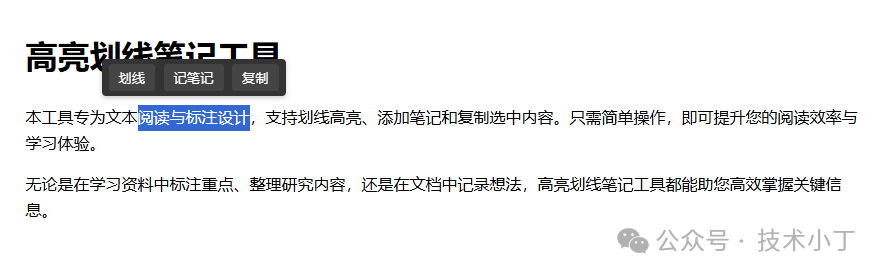
在日常的学习和工作中,我们经常需要处理大量的文本信息。为了更好地理解和记忆这些信息,标记重点、添加注释以及复制内容是必不可少的操作。本文将介绍一个基于 HTML、CSS和 JavaScript 实现的高亮划线笔记工具,它能够帮助用户高效地进行文本阅读与标注。效果演示
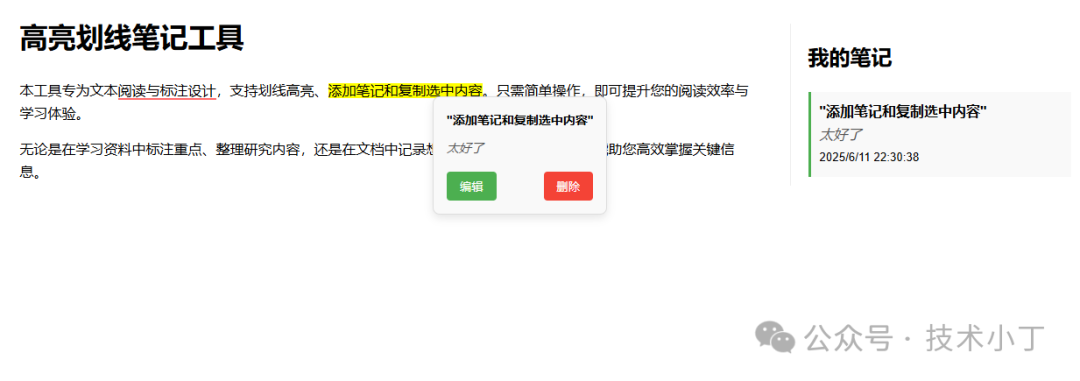
功能概览
本项目主要包含以下核心功能:
页面结构
主要内容区域
<div class="content"> <h1>高亮划线笔记工具</h1> <p>本工具专为文本阅读与标注设计,支持划线高亮、添加笔记和复制选中内容。只需简单操作,即可提升您的阅读效率与学习体验。</p> <p>无论是在学习资料中标注重点、整理研究内容,还是在文档中记录想法,高亮划线笔记工具都能助您高效掌握关键信息。</p></div>
工具栏
文本被选中后弹出工具栏,提供用户操作入口,包含三个功能按钮:划线、记笔记和复制。根据用户的鼠标选择动态显示在选中文本的上方,方便快速访问相关功能。<div id="toolbar"> <button id="underline-btn">划线</button> <button id="note-btn">记笔记</button> <button id="copy-btn">复制</button></div>
笔记弹窗
当用户点击已高亮的文本时,显示对应的笔记内容和操作按钮。包含被高亮的原文和添加的笔记内容。提供“编辑”和“删除”按钮,用于对笔记进行修改或移除操作。<div id="note-popup" class="note-popup"> <div class="note-content"></div> <div class="note-text"></div> <div class="note-actions"> <button class="edit">编辑</button> <button class="delete">删除</button> </div></div>
笔记列表区域
展示用户添加的所有笔记内容。通过 js 动态插入笔记条目。每个笔记包含高亮的原文、用户输入的注释以及创建时间。<div id="notes-container"> <h2>我的笔记</h2> <div id="notes-list"></div></div>
核心功能实现
选中文本后显示工具栏
监听 content 区域的鼠标释放事件(mouseup),用于检测用户是否选中了文本。当检测到有效选中文本时,显示工具栏并将其定位在选中文本的上方中间位置。contentElem.addEventListener('mouseup', function(e) { selectedText = window.getSelection().toString().trim(); if (selectedText.length > 0) { const selection = window.getSelection(); if (selection.rangeCount > 0) { selectedRange = selection.getRangeAt(0); }
toolbar.style.display = 'block';
const rangeRect = selectedRange.getBoundingClientRect(); const centerX = rangeRect.left + rangeRect.width / 2; const centerY = rangeRect.top + rangeRect.height / 2;
toolbar.style.left = (centerX - toolbar.offsetWidth / 2) + 'px'; toolbar.style.top = (e.pageY - 60) + 'px'; } else { toolbar.style.display = 'none'; }});
document.addEventListener('mousedown', function(e) { if (!toolbar.contains(e.target)) { toolbar.style.display = 'none'; }});
划线功能
当用户点击工具栏的“划线”按钮时,在当前选中的文本周围插入一个带有 underline 样式的 span 元素,实现下划线效果。
为该下划线元素添加点击事件,点击后可移除划线(将文本还原为普通文本)。执行完划线操作后隐藏工具栏并清除文本选中状态。
underlineBtn.addEventListener('click', function() { if (selectedRange && selectedText.length > 0) { const span = document.createElement('span'); span.className = 'underline'; span.addEventListener('click', function(e) { e.stopPropagation(); const parent = this.parentNode; const text = document.createTextNode(this.textContent); parent.replaceChild(text, this); parent.normalize(); }); selectedRange.surroundContents(span); toolbar.style.display = 'none'; window.getSelection().removeAllRanges(); }});
记笔记功能
当用户点击工具栏的“记笔记”按钮时,弹出输入框让用户为当前选中的文本添加笔记内容。点击确定保存后,将选中文本和用户输入的笔记内容展示在右侧笔记列表中。在正文区域插入一个带有高亮样式的 span,并绑定点击事件用于显示对应的笔记内容。
点击高亮文本时,会弹出包含原文和笔记内容的浮动窗口,支持查看、编辑或删除笔记。
noteBtn.addEventListener('click', function() { if (selectedText.length > 0) { const noteTextContent = prompt('为选中的文本添加笔记:', ''); if (noteTextContent !== null) { const noteElement = document.createElement('div'); noteElement.className = 'note'; noteElement.innerHTML = `<div class="note-content">"${selectedText}"</div><div class="note-text">${noteTextContent}</div><small>${new Date().toLocaleString()}</small>`; const highlight = document.createElement('span'); highlight.className = 'highlight'; highlight.textContent = selectedText; highlight.dataset.noteId = notesList.children.length; selectedRange.deleteContents(); selectedRange.insertNode(highlight); highlight.addEventListener('click', function(e) { e.stopPropagation(); currentNote = this; noteContent.textContent = `"${this.textContent}"`; noteText.textContent = notesList.children[this.dataset.noteId].querySelector('.note-text').textContent; notePopup.style.left = e.pageX + 'px'; notePopup.style.top = e.pageY + 'px'; notePopup.classList.add('active'); }); notesList.appendChild(noteElement); toolbar.style.display = 'none'; window.getSelection().removeAllRanges(); } }});
笔记编辑功能
当用户点击弹窗中的“编辑”按钮时,弹出输入框并显示当前笔记内容。用户输入新内容后,会同时更新右侧笔记列表中对应的文本内容。弹窗中的笔记内容也会同步更新,实现即时反馈。editBtn.addEventListener('click', function() { const newText = prompt('编辑笔记:', noteText.textContent); if (newText !== null) { currentNote.dataset.noteId; notesList.children[currentNote.dataset.noteId].querySelector('.note-text').textContent = newText; noteText.textContent = newText; }});
删除笔记功能
当用户点击弹窗中的“删除”按钮时,从右侧笔记列表中移除对应的笔记条目。将页面中高亮显示的文本还原为普通文本(去除高亮样式)。同时隐藏笔记弹窗,完成删除操作。deleteBtn.addEventListener('click', function() { notesList.removeChild(notesList.children[currentNote.dataset.noteId]); currentNote.parentNode.replaceChild(document.createTextNode(currentNote.textContent), currentNote); notePopup.classList.remove('active');});
扩展建议
数据持久化:使用 localStorage 实现本地持久化存储,或者集成后端 API,支持将笔记同步到服务器,实现跨设备访问。
支持多文档/章节管理:左侧添加文档/文章列表,支持切换不同内容进行标注。每个文档的笔记独立存储,互不影响。
增强笔记交互体验:添加标签分类、颜色标记等功能。支持富文本编辑器来输入更丰富的笔记内容。
搜索与回顾功能:添加搜索框,支持按关键词检索所有笔记。提供“复习模式”,逐条展示笔记并隐藏原文,用于自测回顾。
快捷键支持:快速添加高亮、笔记,关闭弹窗或取消工具栏。
完整代码
<!DOCTYPE html><html lang="zh-CN"><head> <meta charset="UTF-8"> <meta name="viewport" content="width=device-width, initial-scale=1.0"> <title>高亮划线笔记工具</title> <style> body { font-family: 'Arial', sans-serif; line-height: 1.6; max-width: 1200px; margin: 0 auto; padding: 20px; }
.content { margin-bottom: 30px; float: left; width: 70%; }
#toolbar { position: fixed; display: none; background: #333; border-radius: 4px; padding: 5px; box-shadow: 0 2px 5px rgba(0,0,0,0.2); z-index: 1000; }
#toolbar button { background: #444; color: white; border: none; padding: 5px 10px; margin: 0 2px; border-radius: 3px; cursor: pointer; }
#toolbar button:hover { background: #555; }
.underline { cursor: pointer; position: relative; border-bottom: 2px solid #ff6b6b; }
.underline:hover::after { content: "×"; position: absolute; right: -15px; top: -10px; color: red; font-size: 16px; background: white; border-radius: 50%; width: 18px; height: 18px; display: flex; align-items: center; justify-content: center; box-shadow: 0 0 3px rgba(0,0,0,0.3); }
#notes-container { float: right; width: 25%; border-left: 1px solid #eee; padding-left: 20px; margin-top: 30px; }
.note { background: #f9f9f9; padding: 10px; margin-bottom: 10px; border-left: 3px solid #4CAF50; }
.note-text { font-style: italic; color: #555; }
.note-content { font-weight: bold; }
.highlight { background-color: #ffff00; cursor: pointer; }
.note-popup { display: none; position: absolute; background: #f9f9f9; border: 1px solid #ddd; border-radius: 8px; padding: 15px; box-shadow: 0 4px 10px rgba(0, 0, 0, 0.1); z-index: 1001; font-size: 14px; line-height: 1.6; min-width: 150px; }
.note-popup.active { display: block; }
.note-popup .note-content { font-weight: bold; margin-bottom: 10px; }
.note-popup .note-text { font-style: italic; color: #555; margin-bottom: 15px; }
.note-popup .note-actions { display: flex; justify-content: space-between; }
.note-popup .note-actions button { background: #4CAF50; color: white; border: none; padding: 8px 15px; border-radius: 4px; cursor: pointer; transition: background 0.3s ease; }
.note-popup .note-actions button:hover { background: #45a049; }
.note-popup .note-actions button.delete { background: #f44336; }
.note-popup .note-actions button.delete:hover { background: #d32f2f; } </style></head><body><div id="toolbar"> <button id="underline-btn">划线</button> <button id="note-btn">记笔记</button> <button id="copy-btn">复制</button></div><div id="note-popup" class="note-popup"> <div class="note-content"></div> <div class="note-text"></div> <div class="note-actions"> <button class="edit">编辑</button> <button class="delete">删除</button> </div></div><div id="content" class="content"> <h1>高亮划线笔记工具</h1> <p>本工具专为文本阅读与标注设计,支持划线高亮、添加笔记和复制选中内容。只需简单操作,即可提升您的阅读效率与学习体验。</p> <p>无论是在学习资料中标注重点、整理研究内容,还是在文档中记录想法,高亮划线笔记工具都能助您高效掌握关键信息。</p></div><div id="notes-container"> <h2>我的笔记</h2> <div id="notes-list"></div></div><script> document.addEventListener('DOMContentLoaded', function() { const toolbar = document.getElementById('toolbar'); const contentElem = document.getElementById('content'); const underlineBtn = document.getElementById('underline-btn'); const noteBtn = document.getElementById('note-btn'); const copyBtn = document.getElementById('copy-btn'); const notesList = document.getElementById('notes-list'); const notePopup = document.getElementById('note-popup'); const noteContent = notePopup.querySelector('.note-content'); const noteText = notePopup.querySelector('.note-text'); const editBtn = notePopup.querySelector('.edit'); const deleteBtn = notePopup.querySelector('.delete');
let selectedText = ''; let selectedRange = null; let currentNote = null;
contentElem.addEventListener('mouseup', function(e) { selectedText = window.getSelection().toString().trim(); if (selectedText.length > 0) { const selection = window.getSelection(); if (selection.rangeCount > 0) { selectedRange = selection.getRangeAt(0); }
toolbar.style.display = 'block';
const rangeRect = selectedRange.getBoundingClientRect(); const centerX = rangeRect.left + rangeRect.width / 2; const centerY = rangeRect.top + rangeRect.height / 2;
toolbar.style.left = (centerX - toolbar.offsetWidth / 2) + 'px'; toolbar.style.top = (e.pageY - 60) + 'px'; } else { toolbar.style.display = 'none'; } });
document.addEventListener('mousedown', function(e) { if (!toolbar.contains(e.target)) { toolbar.style.display = 'none'; } });
underlineBtn.addEventListener('click', function() { if (selectedRange && selectedText.length > 0) { const span = document.createElement('span'); span.className = 'underline'; span.addEventListener('click', function(e) { e.stopPropagation(); const parent = this.parentNode; const text = document.createTextNode(this.textContent); parent.replaceChild(text, this); parent.normalize(); }); selectedRange.surroundContents(span); toolbar.style.display = 'none'; window.getSelection().removeAllRanges(); } });
copyBtn.addEventListener('click', function() { if (selectedText.length > 0) { navigator.clipboard.writeText(selectedText) .then(() => { alert('已复制到剪贴板: ' + selectedText); toolbar.style.display = 'none'; }) .catch(err => { console.error('复制失败: ', err); }); } });
noteBtn.addEventListener('click', function() { if (selectedText.length > 0) { const noteTextContent = prompt('为选中的文本添加笔记:', ''); if (noteTextContent !== null) { const noteElement = document.createElement('div'); noteElement.className = 'note'; noteElement.innerHTML = `<div class="note-content">"${selectedText}"</div> <div class="note-text">${noteTextContent}</div> <small>${new Date().toLocaleString()}</small>`; const highlight = document.createElement('span'); highlight.className = 'highlight'; highlight.textContent = selectedText; highlight.dataset.noteId = notesList.children.length; selectedRange.deleteContents(); selectedRange.insertNode(highlight); highlight.addEventListener('click', function(e) { e.stopPropagation(); currentNote = this; noteContent.textContent = `"${this.textContent}"`; noteText.textContent = notesList.children[this.dataset.noteId].querySelector('.note-text').textContent; notePopup.style.left = e.pageX + 'px'; notePopup.style.top = e.pageY + 'px'; notePopup.classList.add('active'); }); notesList.appendChild(noteElement); toolbar.style.display = 'none'; window.getSelection().removeAllRanges(); } } });
editBtn.addEventListener('click', function() { const newText = prompt('编辑笔记:', noteText.textContent); if (newText !== null) { currentNote.dataset.noteId; notesList.children[currentNote.dataset.noteId].querySelector('.note-text').textContent = newText; noteText.textContent = newText; } });
deleteBtn.addEventListener('click', function() { notesList.removeChild(notesList.children[currentNote.dataset.noteId]); currentNote.parentNode.replaceChild(document.createTextNode(currentNote.textContent), currentNote); notePopup.classList.remove('active'); });
document.addEventListener('mousedown', function(e) { if (!notePopup.contains(e.target)) { notePopup.classList.remove('active'); } }); });</script></body></html>
阅读原文:https://mp.weixin.qq.com/s/HluwjtVt-MPXgyrcQtMU6Q
该文章在 2025/12/27 12:56:56 编辑过




 400 186 1886