随着信息获取方式的多样化,文字转语音(TTS)成为提升阅读体验的重要功能。用户可以通过语音播放解放双眼,特别适合长时间阅读、视力障碍用户或通勤场景。文章听读功能不仅能提高内容可访问性,还能让用户在多任务处理时保持信息输入。本文将介绍如何使用 HTML、CSS 和 JavaScript 实现文章听读功能。效果演示
这个文章听读功能实现了完整的语音播放体验。用户点击开始按钮后,文章内容会逐句朗读,当前播放句子高亮显示并自动滚动到视窗中央。用户可以暂停、继续、停止播放,也可以点击任意句子直接跳转播放。控制面板提供语音选择、进度条和计数器,实时显示播放进度。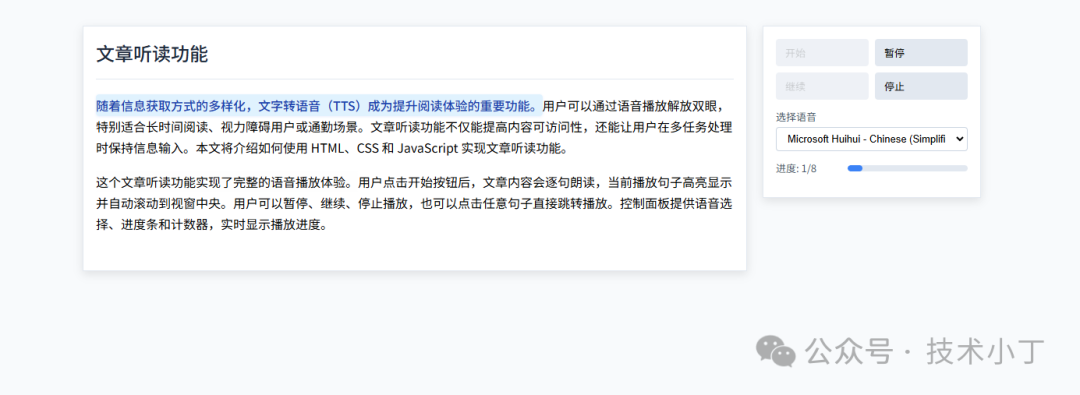
页面结构
文章区域
<div class="article-area"> <header class="header"> <h1>文章听读功能</h1> </header> <article class="article" id="article"> <p>随着信息获取方式的多样化,文字转语音(TTS)成为提升阅读体验的重要功能。用户可以通过语音播放解放双眼,特别适合长时间阅读、视力障碍用户或通勤场景。文章听读功能不仅能提高内容可访问性,还能让用户在多任务处理时保持信息输入。本文将介绍如何使用 HTML、CSS 和 JavaScript 实现文章听读功能。</p> <p>这个文章听读功能实现了完整的语音播放体验。用户点击开始按钮后,文章内容会逐句朗读,当前播放句子高亮显示并自动滚动到视窗中央。用户可以暂停、继续、停止播放,也可以点击任意句子直接跳转播放。控制面板提供语音选择、进度条和计数器,实时显示播放进度。</p> </article></div>
控制面板
<div class="reader-panel"> <div class="controls"> <button id="playBtn" class="btn" onclick="handlePlayAction('play')">开始</button> <button id="pauseBtn" class="btn" disabled onclick="handlePlayAction('pause')">暂停</button> <button id="resumeBtn" class="btn" disabled onclick="handlePlayAction('resume')">继续</button> <button id="stopBtn" class="btn" disabled onclick="handlePlayAction('stop')">停止</button> </div> <div class="voice-control"> <label for="voiceSelect">选择语音</label> <select id="voiceSelect" class="voice-select" aria-label="选择朗读语音"></select> </div> <div class="progress-container"> <div class="progress-info"> 进度: <span id="progressText">0/0</span> </div> <div class="progress-bar"> <div class="progress-fill" id="progressFill"></div> </div> </div></div>
核心功能实现
句子分割与渲染
createSentenceElements 函数将文章段落按句子拆分,为每句话创建独立元素,便于点击跳转和高亮显示。使用正则表达式匹配句号、感叹号、问号等标点符号进行分割。function createSentenceElements(paragraphElement) { const text = paragraphElement.textContent; const sentenceArray = text.split(/(?<=[。!?!?])\s*/g).filter(s => s.trim().length > 0); paragraphElement.innerHTML = sentenceArray.map(s => `<span class="sentence">${s}</span>`).join('');}
语音合成初始化
initSpeechSynthesis 函数获取系统支持的语音列表,填充到选择器中,并默认选择中文语音。当语音列表变化时,重新初始化语音选项。function initSpeechSynthesis() { voices = speechSynthesis.getVoices(); const voiceSelect = document.getElementById('voiceSelect'); voiceSelect.innerHTML = voices.map((v, i) => `<option value="${i}">${v.name} (${v.lang})</option>`).join(''); const preferredVoiceIndex = voices.findIndex(v => v.lang.includes('zh') || v.lang.includes('cmn')); voiceSelect.value = preferredVoiceIndex !== -1 ? preferredVoiceIndex : voices.length > 0 ? 0 : '';}
播放控制逻辑
handlePlayAction 函数实现播放、暂停、继续、停止等核心控制功能。通过 SpeechSynthesis 接口控制语音播放状态,并更新按钮状态。function handlePlayAction(action) { switch(action) { case 'play': currentSentenceIndex = 0; speakSentence(currentSentenceIndex); break; case 'pause': if (speechSynthesis.speaking && !isPaused) { speechSynthesis.pause(); isPaused = true; } break; case 'resume': if (isPaused) { speechSynthesis.resume(); isPaused = false; } break; case 'stop': speechSynthesis.cancel(); isPaused = false; removeReadingStyles(); break; } updateButtonStates();}
语音播放与状态管理
speakSentence 函数控制单个句子的语音播放,设置播放速率和语音类型,处理播放开始、结束和错误事件,实现自动播放下一句的功能。function speakSentence(index) { if (index >= sentences.length || index < 0) return; if (currentUtterance) speechSynthesis.cancel(); currentSentenceIndex = Math.max(0, Math.min(index, sentences.length - 1)); updateHighlight(currentSentenceIndex); const selectedVoiceIndex = parseInt(document.getElementById('voiceSelect').value); const utterance = new SpeechSynthesisUtterance(sentences[currentSentenceIndex].textContent); if (voices[selectedVoiceIndex]) utterance.voice = voices[selectedVoiceIndex]; utterance.rate = rate; utterance.onstart = function() { sentences[currentSentenceIndex].classList.add('current'); updateButtonStates(); }; utterance.onend = function() { sentences[currentSentenceIndex].classList.remove('current'); if (!isPaused && currentSentenceIndex < sentences.length - 1) { currentSentenceIndex++; speakSentence(currentSentenceIndex); } else updateButtonStates(); }; utterance.onerror = function(e) { console.error('Speech error:', e.error); isPaused = false; updateButtonStates(); }; currentUtterance = utterance; speechSynthesis.speak(utterance); updateProgress();}
扩展建议
完整代码
git地址:https://gitee.com/ironpro/hjdemo/blob/master/article-read/index.html<!DOCTYPE html><html lang="zh-CN"><head> <meta charset="utf-8"> <meta name="viewport" content="width=device-width, initial-scale=1.0"> <title>文章听读功能</title> <style> * { margin: 0; padding: 0; box-sizing: border-box; } body { background-color: #f8fafc; min-height: 100vh; padding: 16px; } .container { max-width: 1200px; margin: 0 auto; border-radius: 8px; padding: 24px; display: flex; gap: 0; } .article-area { flex: 1; max-width: calc(100% - 300px); border: 1px solid #e2e8f0; box-shadow: 0 4px 14px rgba(0, 0, 0, 0.1); background: white; padding: 16px; margin-right: 20px; } .header { padding-bottom: 16px; border-bottom: 1px solid #e2e8f0; margin-bottom: 20px; } .header h1 { font-size: 24px; font-weight: 500; color: #1e293b; } .article { font-size: 16px; line-height: 1.7; margin-bottom: 30px; } .article p { margin-bottom: 16px; } .sentence { border-radius: 4px; transition: background-color 0.2s ease; cursor: pointer; padding: 2px 0; display: inline; } .sentence:hover { background-color: #f1f5f9; } .current { background: #e0f2fe !important; color: #1e40af; font-weight: 500; border-radius: 4px; padding: 2px 0; box-shadow: 0 1px 3px rgba(37, 99, 235, 0.1); } .reader-panel { width: 280px; background: white; border: 1px solid #e2e8f0; padding: 16px; box-shadow: 0 4px 14px rgba(0, 0, 0, 0.1); position: sticky; top: 24px; height: fit-content; max-height: calc(100vh - 48px); overflow-y: auto; } .controls { display: flex; flex-wrap: wrap; gap: 8px; margin-bottom: 14px; } .btn { padding: 8px 14px; background: #e2e8f0; border: none; border-radius: 4px; cursor: pointer; font-size: 13px; transition: background-color 0.2s; display: flex; align-items: center; gap: 4px; flex: 1 1 calc(50% - 4px); } .btn:hover:not(:disabled) { background: #cbd5e1; } .btn:disabled { background: #e2e8f0; cursor: not-allowed; opacity: 0.6; } .voice-control { display: flex; flex-direction: column; gap: 4px; margin-bottom: 14px; } label { font-size: 13px; color: #475569; } select { padding: 6px 10px; border-radius: 4px; border: 1px solid #cbd5e1; font-size: 13px; background-color: white; } .progress-container { display: flex; align-items: center; gap: 14px; margin-bottom: 14px; } .progress-info { font-size: 13px; color: #475569; min-width: 80px; } .progress-bar { flex: 1; height: 8px; background-color: #e2e8f0; border-radius: 4px; overflow: hidden; } .progress-fill { height: 100%; width: 0; background: #3b82f6; border-radius: 4px; transition: width 0.3s ease; } </style></head><body><div class="container"> <div class="article-area"> <header class="header"> <h1>文章听读功能</h1> </header> <article class="article" id="article"> <p>随着信息获取方式的多样化,文字转语音(TTS)成为提升阅读体验的重要功能。用户可以通过语音播放解放双眼,特别适合长时间阅读、视力障碍用户或通勤场景。文章听读功能不仅能提高内容可访问性,还能让用户在多任务处理时保持信息输入。本文将介绍如何使用 HTML、CSS 和 JavaScript 实现文章听读功能。</p> <p>这个文章听读功能实现了完整的语音播放体验。用户点击开始按钮后,文章内容会逐句朗读,当前播放句子高亮显示并自动滚动到视窗中央。用户可以暂停、继续、停止播放,也可以点击任意句子直接跳转播放。控制面板提供语音选择、进度条和计数器,实时显示播放进度。</p> </article> </div> <div class="reader-panel"> <div class="controls"> <button id="playBtn" class="btn" onclick="handlePlayAction('play')">开始</button> <button id="pauseBtn" class="btn" disabled onclick="handlePlayAction('pause')">暂停</button> <button id="resumeBtn" class="btn" disabled onclick="handlePlayAction('resume')">继续</button> <button id="stopBtn" class="btn" disabled onclick="handlePlayAction('stop')">停止</button> </div> <div class="voice-control"> <label for="voiceSelect">选择语音</label> <select id="voiceSelect" class="voice-select" aria-label="选择朗读语音"></select> </div> <div class="progress-container"> <div class="progress-info"> 进度: <span id="progressText">0/0</span> </div> <div class="progress-bar"> <div class="progress-fill" id="progressFill"></div> </div> </div> </div></div>
<script> const speechSynthesis = window.speechSynthesis; let voices = []; let currentUtterance = null; let currentSentenceIndex = 0; let isPaused = false; let sentences = []; const rate = 1.5;
function createSentenceElements(paragraphElement) { const text = paragraphElement.textContent; const sentenceArray = text.split(/(?<=[。!?!?])\s*/g).filter(s => s.trim().length > 0); paragraphElement.innerHTML = sentenceArray.map(s => `<span class="sentence">${s}</span>`).join(''); }
function initReading() { document.querySelectorAll('#article p').forEach(createSentenceElements); sentences = document.querySelectorAll('.sentence'); initSpeechSynthesis(); setupEventListeners(); }
function initSpeechSynthesis() { voices = speechSynthesis.getVoices(); const voiceSelect = document.getElementById('voiceSelect'); voiceSelect.innerHTML = voices.map((v, i) => `<option value="${i}">${v.name} (${v.lang})</option>`).join(''); const preferredVoiceIndex = voices.findIndex(v => v.lang.includes('zh') || v.lang.includes('cmn')); voiceSelect.value = preferredVoiceIndex !== -1 ? preferredVoiceIndex : voices.length > 0 ? 0 : ''; }
function setupEventListeners() { speechSynthesis.onvoiceschanged = initSpeechSynthesis; sentences.forEach((s, i) => s.addEventListener('click', () => handleClickSentence(i))); }
function handlePlayAction(action) { switch(action) { case 'play': currentSentenceIndex = 0; speakSentence(currentSentenceIndex); break; case 'pause': if (speechSynthesis.speaking && !isPaused) { speechSynthesis.pause(); isPaused = true; } break; case 'resume': if (isPaused) { speechSynthesis.resume(); isPaused = false; } break; case 'stop': speechSynthesis.cancel(); isPaused = false; removeReadingStyles(); break; } updateButtonStates(); }
function handleClickSentence(index) { if (currentUtterance) speechSynthesis.cancel(); isPaused = false; currentSentenceIndex = index; removeReadingStyles(); speakSentence(currentSentenceIndex); updateButtonStates(); }
function speakSentence(index) { if (index >= sentences.length || index < 0) return; if (currentUtterance) speechSynthesis.cancel(); currentSentenceIndex = Math.max(0, Math.min(index, sentences.length - 1)); updateHighlight(currentSentenceIndex); const selectedVoiceIndex = parseInt(document.getElementById('voiceSelect').value); const utterance = new SpeechSynthesisUtterance(sentences[currentSentenceIndex].textContent); if (voices[selectedVoiceIndex]) utterance.voice = voices[selectedVoiceIndex]; utterance.rate = rate; utterance.onstart = function() { sentences[currentSentenceIndex].classList.add('current'); updateButtonStates(); }; utterance.onend = function() { sentences[currentSentenceIndex].classList.remove('current'); if (!isPaused && currentSentenceIndex < sentences.length - 1) { currentSentenceIndex++; speakSentence(currentSentenceIndex); } else updateButtonStates(); }; utterance.onerror = function(e) { console.error('Speech error:', e.error); isPaused = false; updateButtonStates(); }; currentUtterance = utterance; speechSynthesis.speak(utterance); updateProgress(); }
function updateHighlight(index) { sentences.forEach((s, i) => { s.classList.remove('current'); if (i === index) { s.classList.add('current'); s.scrollIntoView({ behavior: 'smooth', block: 'center' }); } }); }
function updateButtonStates() { const isSpeaking = speechSynthesis.speaking; const isPlaying = isSpeaking && !isPaused; document.getElementById('playBtn').disabled = isPlaying; document.getElementById('pauseBtn').disabled = !isSpeaking || isPaused; document.getElementById('resumeBtn').disabled = !isPaused; document.getElementById('stopBtn').disabled = !isSpeaking; }
function removeReadingStyles() { sentences.forEach(s => s.classList.remove('current')); }
function updateProgress() { const progressText = document.getElementById('progressText'); const progressFill = document.getElementById('progressFill'); if (progressText && progressFill) { const percentage = ((currentSentenceIndex + 1) / sentences.length) * 100; progressText.textContent = `${currentSentenceIndex + 1}/${sentences.length}`; progressFill.style.width = `${percentage}%`; } }
document.addEventListener('DOMContentLoaded', initReading);</script></body></html>
阅读原文:https://mp.weixin.qq.com/s/fDVEpzGgh5SPj14PG1bnyw
该文章在 2026/2/4 16:28:50 编辑过






 400 186 1886