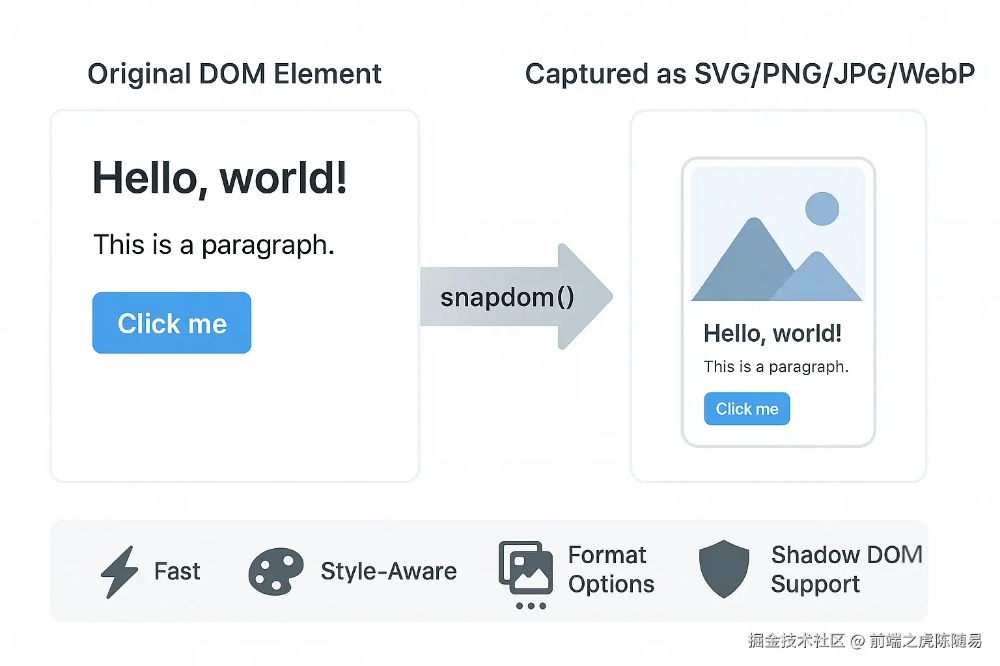
你是否曾经为了保存网页上的一个精美设计而烦恼?是否想过把动态生成的数据图表分享给同事?今天要介绍的 snapDOM 不仅能完美解决这些问题,还能以惊人的速度完成任务。
🤔 为什么需要 snapDOM?
在日常开发中,我们经常遇到这些需求:
传统方案要么需要后端支持,要么使用笨重的库,而 snapDOM 让这一切变得异常简单。
⚡ 核心特性一览
1.🚀 极致性能
来看看这组令人震撼的性能数据:
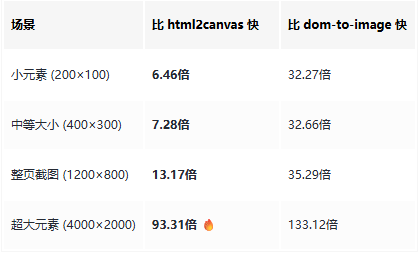
📊 数据来源:snapDOM 官方基准测试,测试环境为 headless Chromium,使用真实 DOM 节点。你也可以通过运行 npm run test:benchmark 在本地验证这些数据。
3.🎯 灵活输出
// 支持多种输出格式
const element = document.querySelector('.my-card');


// SVG - 矢量图,可无损缩放
const svg = await snapdom.toSvg(element);


// PNG - 最常用的格式
const png = await snapdom.toPng(element);


// JPG - 适合照片类内容
const jpg = await snapdom.toJpg(element, { quality: 0.95 });


// WebP - 现代化格式,体积更小
const webp = await snapdom.toWebp(element);


// Canvas - 需要二次处理时使用
const canvas = await snapdom.toCanvas(element);
🛠️ 快速上手
安装方式
# NPM / Yarn
npm i @zumer/snapdom
yarn add @zumer/snapdom


# 或使用 CDN(零配置)
<script src="https://unpkg.com/@zumer/snapdom@latest/dist/snapdom.min.js"></script>


# ES Module
import { snapdom } from '@zumer/snapdom';
基础示例
1。一键截图
// 最简单的使用方式
const card = document.querySelector('.user-card');
const image = await snapdom.toPng(card);


// 显示在页面上
document.body.appendChild(image);
2。高级配置
// 创建可重用的截图实例
const element = document.querySelector('.chart-container');
const capture = await snapdom(element, {
    scale: 2, // 2倍清晰度
    backgroundColor: '#fff', // 背景色
    embedFonts: true, // 内嵌字体
    compress: true // 压缩优化
});


// 导出不同格式
const png = await capture.toPng();
const jpg = await capture.toJpg({ quality: 0.9 });


// 直接触发下载
await capture.download({
    format: 'png',
    filename: 'chart-report-2024'
});
📋 实战应用场景
1。🏆 成就分享卡片
// 游戏成就分享
async function shareAchievement() {
    const card = document.querySelector('.achievement-card');


    // 生成分享图片
    const image = await snapdom.toPng(card, { scale: 2 });


    // 调用分享 API
    navigator.share({
        files: [new File([await snapdom.toBlob(card)], 'achievement.png')],
        title: '我获得了新成就!'
    });
}
2。📊 数据报表导出
// 导出 ECharts 图表及其数据表格
async function exportReport() {
    const reportSection = document.querySelector('.report-section');


    // 预加载资源以优化性能
    await preCache(reportSection);


    // 生成高清报表图片
    await snapdom.download(reportSection, {
        format: 'png',
        scale: 2,
        filename: `report-${new Date().toISOString().split('T')[0]}`
    });
}
3。🎨 动态海报生成
// 电商促销海报
async function generatePoster(productData) {
    // 动态填充数据
    document.querySelector('.poster-title').textContent = productData.name;
    document.querySelector('.poster-price').textContent = `¥${productData.price}`;
    document.querySelector('.poster-image').src = productData.image;


    // 等待图片加载
    await new Promise((resolve) => setTimeout(resolve, 100));


    // 生成海报
    const poster = document.querySelector('.poster-container');
    const blob = await snapdom.toBlob(poster, { scale: 3 });


    // 上传到服务器或直接分享
    return blob;
}
🔧 高级技巧
1。🔍 提升图片清晰度
// 移动端分享图片建议使用 2-3 倍缩放
const hdImage = await snapdom.toPng(element, {
    scale: window.devicePixelRatio * 2
});
2。🔐 处理敏感信息
<!-- HTML 标记 -->
<div class="user-info">
    <span data-capture="placeholder" data-placeholder-text="用户ID"> 13800138000 </span>
    <span data-capture="exclude"> 敏感信息(截图时会被忽略) </span>
</div>
3。⚡ 性能优化策略
import { preCache } from '@zumer/snapdom';


// 方案1:页面加载时预缓存
window.addEventListener('load', async () => {
    await preCache(document.body, { embedFonts: true });
    console.log('✅ 资源预加载完成');
});


// 方案2:按需预缓存
async function captureWithCache(element) {
    // 首次截图前预缓存
    if (!element.dataset.cached) {
        await preCache(element);
        element.dataset.cached = 'true';
    }


    return snapdom.toPng(element);
}
4。🎯 批量处理
// 批量导出多个元素
async function batchExport(selector) {
    const elements = document.querySelectorAll(selector);
    const images = [];


    // 使用 Promise.all 并行处理
    const promises = Array.from(elements).map(async (el, index) => {
        const blob = await snapdom.toBlob(el);
        return {
            name: `export-${index + 1}.png`,
            blob
        };
    });


    return Promise.all(promises);
}
⚠️ 注意事项与限制
需要注意的点:
🌐 跨域资源:外部图片必须支持 CORS,否则无法捕获
// 解决方案:使用代理或确保图片服务器配置正确的 CORS 头
img.crossOrigin = 'anonymous';
2.🖼️ iframe 限制:无法捕获 iframe 内部内容
3.🍎 Safari 兼容:WebP 格式在 Safari 上会自动降级为 PNG
4.📦 大型页面:超大页面建议分区域截图,避免内存溢出
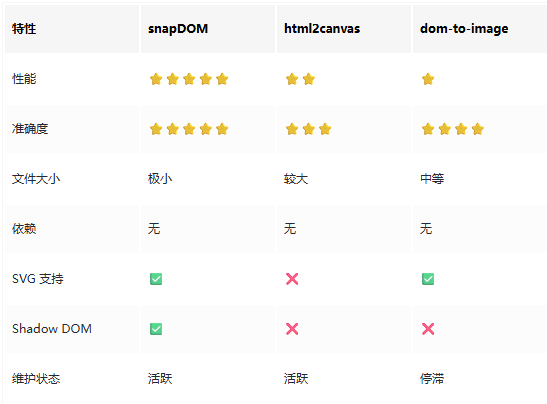
🆚 与其他库的对比
💡 总结
snapDOM 是一个真正做到 简单、快速、准确 的网页截图工具。它的出现让前端截图功能的实现变得异常轻松:
🎯 一行代码即可实现截图功能
⚡ 性能极致快到让人难以置信
🎨 完美还原所见即所得
📦 零依赖轻量无负担
无论你是需要实现社交分享、报表导出,还是内容保存功能,snapDOM 都是目前最佳的选择。它不仅免费开源,还有着活跃的社区支持。
参考文章:原文链接
该文章在 2026/2/6 15:19:18 编辑过





 400 186 1886