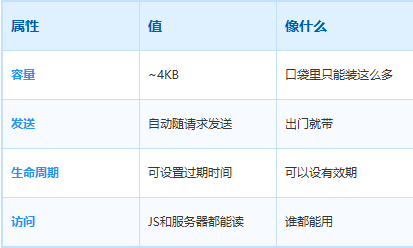
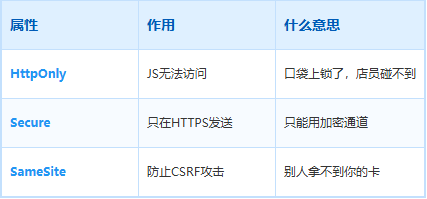
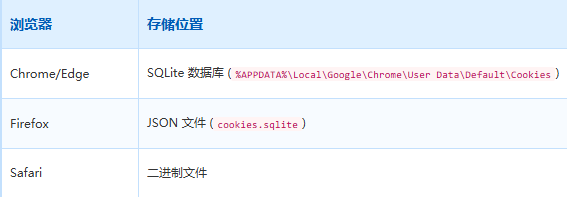
HTTP/1.1 200 OK
Set-Cookie: sessionId=abc123; Path=/; HttpOnly; Secure; SameSite=Strict
HTTP/1.1 200 OK
Cookie: sessionId=abc123
# 会话Cookie(没有Expires/Max-Age)
Set-Cookie: sessionId=abc123
# 关掉浏览器就失效


# 持久Cookie
Set-Cookie: sessionId=abc123; Expires=Wed, 01 Jan 2027 00:00:00 GMT
# 有效期内都有效
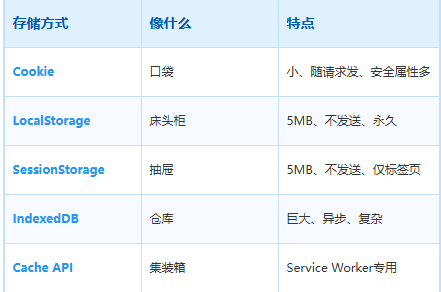
LocalStorage — 床头柜
容量大,但不主动发
LocalStorage 是 HTML5 引入的存储方案。最大的特点:不会随请求发出去。
就像床头柜——你把东西放里面,下次进门直接拿,不用每次出门都背着。
LocalStorage 的特点
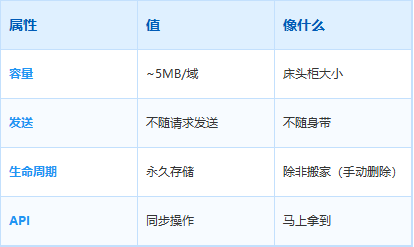
LocalStorage 的使用场景
主题设置:深色/浅色模式
用户偏好:字体大小、语言设置
数据缓存:接口数据本地缓存
LocalStorage 的代码
// 设置
localStorage.setItem('username', '张三');
localStorage.setItem('theme', 'dark');


// 读取
const theme = localStorage.getItem('theme');  // 'dark'


// 删除
localStorage.removeItem('theme');


// 清空
localStorage.clear();


// 遍历
for (let i = 0; i < localStorage.length; i++) {
  const key = localStorage.key(i);
  console.log(`${key}: ${localStorage.getItem(key)}`);
}
LocalStorage 的缺点
同步操作:大量数据会卡界面
只能存字符串:对象要转成 JSON
容量有限:5MB 对大数据不够
深入了解 LocalStorage 🔬
同源策略限制
LocalStorage 遵循同源策略:
代码高亮:
✅ http://example.com 和 https://example.com 共享同一个Storage
✅ http://example.com:8080 和 http://example.com:3000 不共享(端口不同)
✅ http://www.example.com 和 http://example.com 不共享(子域名不同)
存储配额
实际容量取决于浏览器和磁盘空间,Chrome 默认是 5MB(可申请更多):
// 查询当前配额和使用量
navigator.storage.estimate().then(({ usage, quota }) => {
  console.log(`已使用: ${(usage / 1024 / 1024).toFixed(2)} MB`);
  console.log(`总配额: ${(quota / 1024 / 1024).toFixed(2)} MB`);
});


// 请求更大的存储空间(需要用户授权)
navigator.storage.persist().then((granted) => {
  console.log('永久存储权限:', granted);
});
为什么 LocalStorage 是同步的?
因为 LocalStorage 读取是直接读磁盘。如果数据量大,同步读取会阻塞主线程
// ❌ 错误:大数据量时卡界面
localStorage.setItem('bigData', JSON.stringify(largeArray));


// ✅ 更好:拆分存储或用 IndexedDB
SessionStorage — 抽屉
只在当前标签页有效
SessionStorage 和 LocalStorage 几乎一样,唯一的区别是——关闭标签页就没了。
就像抽屉里的东西,只有在这个房间能用。换到另一个房间(另一个标签页),抽屉里的东西就不在了。
SessionStorage 的特点
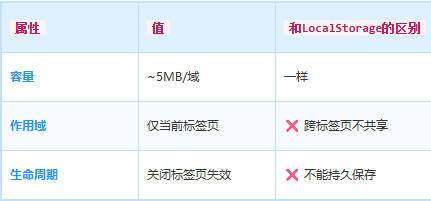
SessionStorage 的使用场景
- 表单草稿:填写到一半的表单
- 临时状态:当前页面的操作状态
SessionStorage 的代码
// 用法和LocalStorage完全一样
sessionStorage.setItem('draft', JSON.stringify({ title: '我的文章', content: '...' }));
关键区别
代码高亮:
// 标签页A中设置
sessionStorage.setItem('key', 'value');
localStorage.setItem('key', 'value');
// 在标签页B中读取
sessionStorage.getItem('key'); // null ❌
localStorage.getItem('key'); // 'value' ✅
深入了解 SessionStorage 🔬
iframe 共享问题
注意:同一个标签页中的 iframe 会共享 SessionStorage(因为是同一个浏览器标签页)
// 父页面
sessionStorage.setItem('shared', 'value');


// iframe 内可以读取到
console.log(sessionStorage.getItem('shared'));  // 'value'
sessionStorage 在隐私模式下
- Chrome 无痕模式:
sessionStorage 仍然存在,但标签页关闭后失效 - Firefox 隐私窗口:完全隔离,每个新窗口都是新的
sessionStorage
和 LocalStorage 的性能对比
两者都是同步 API,性能特性相同。但 SessionStorage 因为数据不持久,有时候比 LocalStorage 更适合存临时数据。
IndexedDB — 仓库
浏览器里的数据库
IndexedDB 是浏览器内置的数据库。容量巨大,能存文件、音频、视频这些大东西。
就像仓库——你家装修工具、电风扇、行李箱都放这儿。东西多,但找起来要翻半天。
IndexedDB 的特点
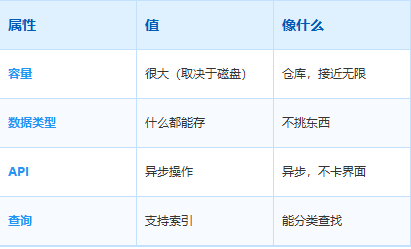
IndexedDB 的使用场景
- 离线数据:PWA离线应用
- 多媒体存储:图片、音频、视频缓存
- 复杂数据:需要索引查询的数据
IndexedDB 的代码
// 打开数据库
const request = indexedDB.open('myDatabase', 1);


// 创建表(对象存储)
request.onupgradeneeded = (event) => {
  const db = event.target.result;
  const store = db.createObjectStore('users', { keyPath: 'id' });
  store.createIndex('name', 'name', { unique: false });
  store.createIndex('email', 'email', { unique: true });
};


// 添加数据
request.onsuccess = (event) => {
  const db = event.target.result;
  const tx = db.transaction(['users'], 'readwrite');
  const store = tx.objectStore('users');


  store.add({ id: 1, name: '张三', email: 'zhangsan@example.com' });
  store.add({ id: 2, name: '李四', email: 'lisi@example.com' });
};


// 查询数据
const getRequest = store.get(1);
getRequest.onsuccess = () => {
  console.log('查询结果:', getRequest.result);
};


// 使用索引查询
const index = store.index('name');
const indexRequest = index.get('张三');
indexRequest.onsuccess = () => {
  console.log('索引查询结果:', indexRequest.result);
};
IndexedDB 的缺点
- API 复杂:需要写一堆回调
- 学习成本高:概念多(数据库、表、事务、索引)
深入了解 IndexedDB 🔬
数据库版本和升级
const request = indexedDB.open('myDatabase', 2);  // 版本号从1升到2


request.onupgradeneeded = (event) => {
  const db = event.target.result;


  // 创建新存储
  if (!db.objectStoreNames.contains('products')) {
    db.createObjectStore('products', { keyPath: 'id' });
  }


  // 删除旧存储
  if (db.objectStoreNames.contains('oldData')) {
    db.deleteObjectStore('oldData');
  }
};
事务的原子性
代码高亮:
const tx = db.transaction(['users', 'orders'], 'readwrite');
// 两个操作在一个事务里,要么全成功,要么全失败
tx.objectStore('users').add({ id: 1, name: '张三' });
tx.objectStore('orders').add({ id: 1, userId: 1, product: '电脑' });
tx.oncomplete = () => console.log('事务成功');
tx.onerror = () => console.log('事务失败,全部回滚');
游标遍历大量数据
const tx = db.transaction(['users'], 'readonly');
const store = tx.objectStore('users');
const cursor = store.openCursor();


cursor.onsuccess = (event) => {
  const cur = event.target.result;
  if (cur) {
    console.log('用户:', cur.value.name);
    cur.continue();  // 继续下一个
  }
};
Promise 封装(更简洁的写法)
function openDB(name, version) {
  return new Promise((resolve, reject) => {
    const request = indexedDB.open(name, version);
    request.onupgradeneeded = (e) => resolve(e.target.result);
    request.onsuccess = (e) => resolve(e.target.result);
    request.onerror = (e) => reject(e.target.error);
  });
}


// 使用
const db = await openDB('myDatabase', 1);
const tx = db.transaction('users', 'readwrite');
await tx.objectStore('users').add({ id: 1, name: '张三' });
Cache API — 集装箱
Service Worker 的专属工具
Cache API 是 Service Worker 的一部分,专门用来缓存网络请求。
就像集装箱——你坐飞机带不了大件行李,但可以用集装箱海运。东西多、个头大,但只能走特定渠道。
Cache API 的特点
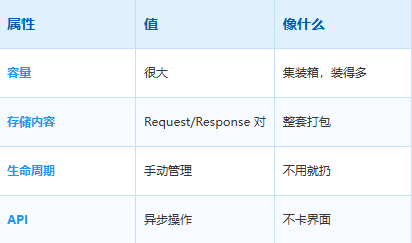
Cache API 的代码
// 在Service Worker中使用
self.addEventListener('fetch', (event) => {
  event.respondWith(
    caches.match(event.request)
      .then((cachedResponse) => {
        return cachedResponse || fetch(event.request);
      })
  );
});


// 打开缓存
caches.open('my-cache').then((cache) => {
  cache.addAll([
    '/css/style.css',
    '/js/app.js',
    '/images/logo.png'
  ]);
});


// 缓存特定请求
cache.put(request, response);


// 删除缓存
caches.delete('my-cache');
深入了解 Cache API 🔬
缓存策略
代码高亮:
// Cache First(缓存优先)
self.addEventListener('fetch', (event) => {
event.respondWith(
caches.match(event.request)
.then((response) => response || fetch(event.request))
);
});
// Network First(网络优先)
self.addEventListener('fetch', (event) => {
event.respondWith(
fetch(event.request)
.catch(() => caches.match(event.request))
);
});
// Stale-While-Revalidate(先返回缓存,同时更新缓存)
self.addEventListener('fetch', (event) => {
event.respondWith(
caches.open('my-cache').then((cache) => {
return cache.match(event.request).then((response) => {
const fetchPromise = fetch(event.request).then((networkResponse) => {
cache.put(event.request, networkResponse.clone());
return networkResponse;
});
return response || fetchPromise;
});
})
);
});
Cache API 和 cookies
Cache API 存储的是完整的 Request/Response 对,不只是 body:
// 缓存时包含了headers、status等所有信息
cache.match(request).then((response) => {
  console.log(response.status);      // 200
  console.log(response.headers.get('content-type'));  // 'text/html'
});
缓存清理策略
// 删除指定缓存
caches.delete('old-cache');


// 清理所有版本,只保留最新的
caches.keys().then((cacheNames) => {
  Promise.all(
    cacheNames
      .filter((name) => name.startsWith('app-') && name !== 'app-v2')
      .map((name) => caches.delete(name))
  );
});
代码高亮:
// ✅ 会触发 storage 事件
localStorage.setItem('key', 'value');
localStorage.removeItem('key');
localStorage.clear();
// ❌ 不会触发 storage 事件(同一个标签页)
// Storage Event 只在「其他标签页」变化时触发





 400 186 1886