使用Nginx实现正向代理
|
admin 2026年5月13日 20:55
本文热度 4885
2026年5月13日 20:55
本文热度 4885
|
内网服务器不能直连互联网,想做一个简单的出口网关,既能访问 HTTP,又能访问 HTTPS,同时还要能封禁某些危险站点。这里使用nginx正向代理解决问题。🚀
nginx:1.28.0
本文主要是技术验证,建议直接部署Squid等代理软件。
一、架构图
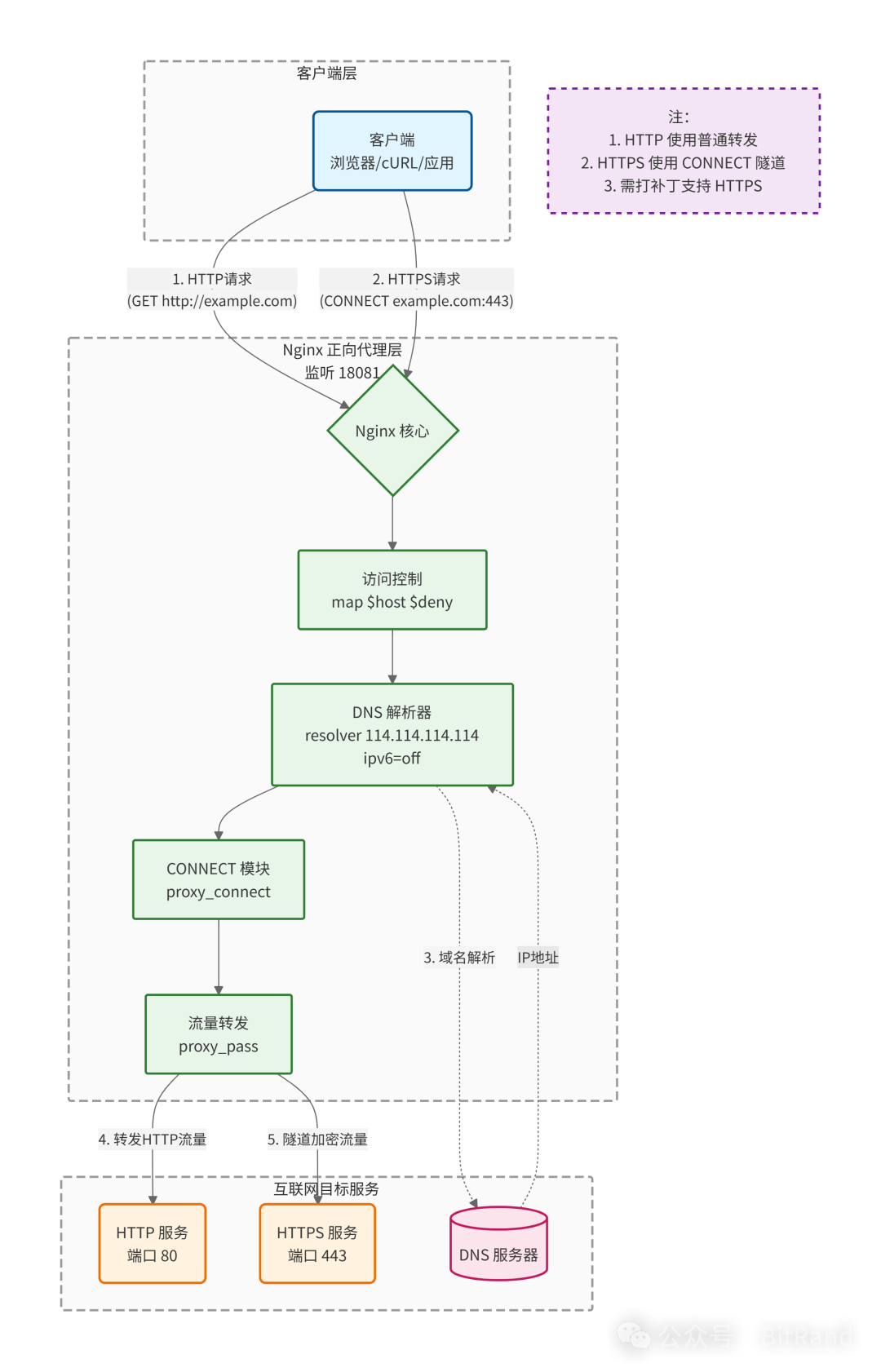
二、基础篇:HTTP 流量代理
首先,我们先搞定最简单的 HTTP 代理。
场景:代理地址是http,实际地址也是http。
1️⃣ 核心配置
这里我们定义了一个 map 规则用于封禁域名,并配置了基础的代理转发。
# 定义黑名单:禁止访问 www.baidu.commap $host $deny {    hostnames;    default 0;    www.baidu.com 1; # 禁止访问www.baidu.com}server {    listen 8080;    resolver 114.114.114.114 ipv6=off;    resolver_timeout 30s;    access_log logs/proxy_access.log; # 记录访问日志    if ($deny) {        return 403;    }
    # return 403 if=$deny;  # 无效语法
    location / {        proxy_limit_rate 102400; # 限制客户端的下载速率是100KB/s        proxy_buffering on ; # 启用代理缓冲        proxy_buffers 8 8k; # 代理缓冲区大小为64KB        proxy_buffer_size 8k; # 响应数据第一部分的缓冲区大小为8KB        proxy_busy_buffers_size 16k; # 向客户端发送响应的缓冲区大小16KB        proxy_temp_file_write_size 16k; # 一次写入临时文件的数据大小为16KB        # 设置所有代理客户端的agent        proxy_set_header User-Agent "Mozilla/5.0 (Windows; U; Windows NT 5.1; zh-CN; rv:1.8.1.14) Gecko/20080404 Firefox/2.0.0.14" ;        proxy_set_header Host $http_host;        proxy_connect_timeout 70s; # 代理连接超时时间        proxy_http_version 1.1; # 代理协议为http/1.1        proxy_pass $scheme://$http_host$request_uri; # 代理到远端服务器    }}
2️⃣ 测试效果
# 通过代理访问 HTTP 网站curl -x http://localhost:8080 http://124.128.226.237:8371/tip/stdlogin.do?method=fwdLoginPage
# 系统代理设置export proxy=http://localhost:8080;# export http_proxy=http://localhost:8080;# export https_proxy=http://192.168.1.12:3128;
三、进阶篇:HTTPS 隧道(CONNECT 方法)
痛点来了:上面的配置只能访问 HTTP。当你试图访问 https:// 时,会发现完全不通。
这是因为 HTTPS 使用的是 CONNECT 隧道,而 Nginx 原生并不支持。
场景:代理地址是http,实际地址https/http。
1️⃣ 给 Nginx “打补丁”
我们需要引入第三方模块 ngx_http_proxy_connect_module。
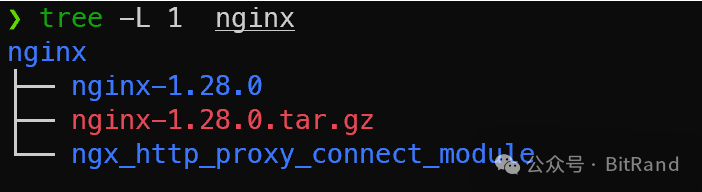
# 开启https代理需要打补丁cd nginxgit clone https://github.com/chobits/ngx_http_proxy_connect_module.git
cd nginx-1.28.0# 根据github介绍材料中的版本兼容,选择合适的补丁文件patch -p1 < ../ngx_http_proxy_connect_module/patch/proxy_connect_rewrite_102101.patchsudo ./configure --with-stream --with-http_ssl_module --add-module=../ngx_http_proxy_connect_modulesudo make install
2️⃣ 推荐配置
打完补丁后,配置文件中需要显式开启 proxy_connect。
server {    listen 18081; # 客户端只需填这个端口    resolver 114.114.114.114 ipv6=off;        # 必须开启,否则 HTTPS 会报 502    proxy_connect;    proxy_connect_allow all;
    # 访问控制    if ($deny) {        return 403;    }
    location / {        # 缓冲与限速优化        proxy_buffering on;        proxy_limit_rate 102400;                # 核心转发逻辑        proxy_set_header Host $http_host;        proxy_pass $scheme://$http_host$request_uri;    }}
3️⃣ 测试验证
# 访问 HTTPcurl -x http://localhost:18081 http://example.com
# 访问 HTTPS(无需改端口)curl -x http://localhost:18081 https://www.oschina.net/
四、代理地址使用https(不建议,只是验证)
场景:代理地址是https,实际地址https/http。
1️⃣ 证书配置
主要是为了在内网使用
# 生成私钥openssl genrsa -des3 -out server.key 2048# 生成证书签名请求 (CSR)openssl req -new -key server.key -out server.csr# 去除私钥密码cp server.key server.key.orgopenssl rsa -in server.key.org -out server.key# 生成自签名证书openssl x509 -req -days 365 -in server.csr -signkey server.key -out server.crt
2️⃣ HTTPS 代理配置
    server {        listen 18080 ssl;        # self signed certificate generated via openssl command        ssl_certificate_key /usr/local/nginx/conf/ssl/server.key;        ssl_certificate /usr/local/nginx/conf/ssl/server.crt;        ssl_session_cache shared:SSL:1m;
        resolver 114.114.114.114 ipv6=off;        resolver_timeout 30s;        access_log logs/proxy_access.log; # 记录访问日志        proxy_connect; # 启用HTTP的CONNECT方法支持        proxy_connect_allow all; # 允许所有端口        proxy_connect_connect_timeout 60s; # 与互联网网站建立连接的超时时间        if ($deny) {            return 403;        }        location / {            proxy_limit_rate 102400; # 限制客户端的下载速率是100KB/s            proxy_buffering on ; # 启用代理缓冲            proxy_buffers 8 8k; # 代理缓冲区大小为64KB            proxy_buffer_size 8k; # 响应数据第一部分的缓冲区大小为8KB            proxy_busy_buffers_size 16k; # 向客户端发送响应的缓冲区大小16KB            proxy_temp_file_write_size 16k; # 一次写入临时文件的数据大小为16KB            # 设置所有代理客户端的agent            proxy_set_header User-Agent "Mozilla/5.0 (Windows; U; Windows NT 5.1; zh-CN; rv:1.8.1.14) Gecko/20080404 Firefox/2.0.0.14" ;            proxy_set_header Host $http_host;            proxy_connect_timeout 70s; # 代理连接超时时间            proxy_http_version 1.1; # 代理协议为http/1.1            proxy_pass $scheme://$http_host$request_uri; # 代理到远端服务器        }    }
3️⃣ 测试效果
curl --proxy-insecure -x https://localhost:18080 https://www.baidu.com
五、避坑指南:那些年我们遇到的 502
❌ 错误现象
curl: (56) CONNECT tunnel failed, response 502
🔍 原因分析
Nginx 在解析域名时优先尝试 IPv6,如果网络环境不支持 IPv6,就会导致隧道建立失败。
✅ 解决方案
在 resolver 指令后强制关闭 IPv6。
resolver 114.114.114.114 ipv6=off;
六、知识点补充:$host 与 $http_host 的区别
| | |
|---|
$host | | |
$http_host | | 代理首选,保留 IP:Port 信息 |
七、总结
至此,一个支持 HTTP/HTTPS 混合流量、具备 访问控制、且 稳定不报错 的 Nginx 正向代理就搭建完成了。
阅读原文:https://mp.weixin.qq.com/s/fZ6y8hti5qgSdxJSNQblYw
该文章在 2026/5/16 9:15:52 编辑过






 400 186 1886