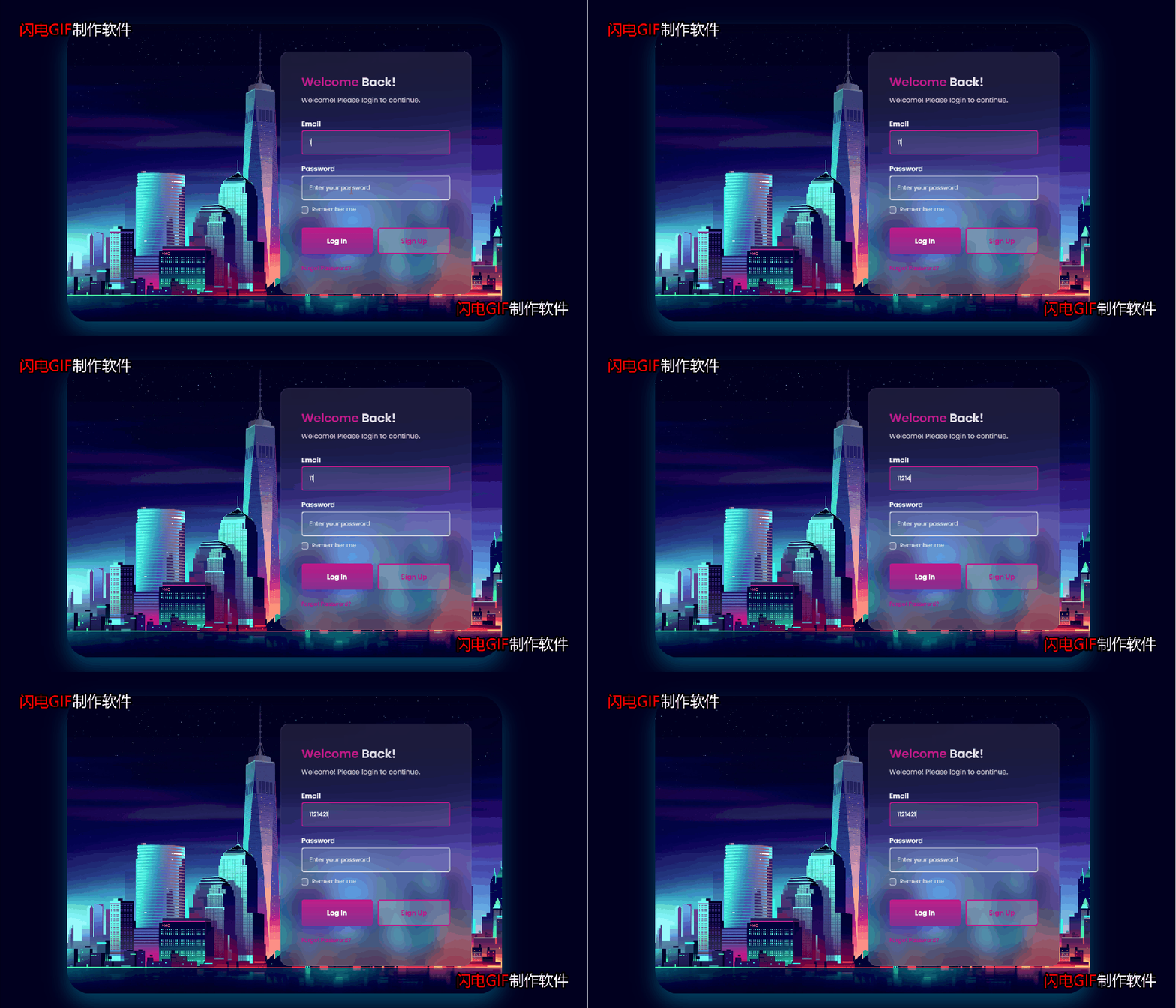
HTML+CSS+JS实现炫酷的登陆页面!附源码
|
admin 2026年10月14日 21:43
本文热度 33
2026年10月14日 21:43
本文热度 33
|
<!DOCTYPE html><html>	<head>		<meta charset="utf-8" />		<title>炫酷登录页</title>		<link rel="stylesheet" href="css/style.css"/>	</head>	<body>		<div class="container">			<div class="login__content">				<img src="https://assets.codepen.io/7773162/4kNYC.jpeg" alt="login image" class="login__img">
				<form action="" class="login__form">					<div>						<h1 class="login__title">							<span>Welcome</span> Back!						</h1>						<p class="login__description">							Welcome! Please login to continue.						</p>					</div>
					<div>						<div class="login__inputs">							<div>								<label for="" class="login__label">Email</label>								<input type="email" placeholder="Enter your email address" required class="login__input">							</div>
							<div>								<label for="" class="login__label">Password</label>
								<div class="login__box">									<input type="password" placeholder="Enter your password" required class="login__input" id="input-pass">									<i class="ri-eye-off-line login__eye" id="input-icon"></i>								</div>							</div>						</div>
						<div class="login__check">							<input type="checkbox" class="login__check-input">							<label for="" class="login__check-label">Remember me</label>						</div>					</div>
					<div>						<div class="login__buttons">							<button class="login__button">Log In</button>							<button class="login__button login__button-ghost">Sign Up</button>						</div>
						<a href="#" class="login__forgot">Forgot Password?</a>					</div>				</form>			</div>		</div>		<script src="js/script.js"></script>	</body></html>
@import url("https://fonts.googleapis.com/css2?family=Poppins:wght@400;500;600&display=swap");
:root { --first-color: #bd1a89; --second-color: #843090; --title-color: rgba(255, 255, 255, 0.9); --text-color: rgba(255, 255, 255, 0.7); --body-color: #01001f;
--body-font: "Poppins", sans-serif; --h2-font-size: 1.25rem; --small-font-size: 0.813rem; --smaller-font-size: 0.75rem;
--font-medium: 500; --font-semi-bold: 600;}
@media screen and (min-width: 1024px) { :root { --h2-font-size: 1.75rem; --normal-font-size: 1rem; --small-font-size: 0.875rem; --smaller-font-size: 0.813rem; }}
* { box-sizing: border-box; padding: 0; margin: 0;}
body { background-color: var(--body-color); font-family: var(--body-font); color: var(--text-color);}
input,button { font-family: var(--body-font); border: none; outline: none;}
img { max-width: 100%; height: auto;}
.login__content,.login__form,.login__inputs { display: grid;}
.login__content { position: relative; height: 100vh; align-items: center;}
.login__img { position: absolute; width: 100%; height: 100%; object-fit: cover; object-position: center;}
.login__form { position: relative; background-color: rgba(255, 255, 255, 0.1); border: 2px solid rgba(255, 255, 255, 0.06); margin-inline: 1.5rem; row-gap: 1.25rem; backdrop-filter: blur(20px); padding: 2rem; border-radius: 1rem;}
.login__title { color: var(--title-color); font-size: var(--h2-font-size); margin-bottom: 0.5rem;}
.login__title span { color: var(--first-color);}
.login__description { font-size: var(--small-font-size);}
.login__inputs { row-gap: 0.75rem; margin-bottom: 0.5rem;}
.login__label { display: block; color: var(--title-color); font-size: var(--small-font-size); font-weight: var(--font-semi-bold); margin-bottom: 0.25rem;}
.login__input { width: 100%; padding: 14px 14px; border-radius: 6px; border: 2px solid var(--text-color); background-color: rgba(255, 255, 255, 0.1); color: var(--title-color); font-size: var(--smaller-font-size); font-weight: var(--font-medium); transition: border 0.4s;}
.login__input::placeholder { color: var(--text-color);}
.login__input:focus,.login__input:valid { border: 2px solid var(--first-color);}
.login__box { position: relative;}
.login__box .login__input { padding-right: 36px;}
.login__eye { width: max-content; height: max-content; position: absolute; right: 0.75rem; top: 0; bottom: 0; margin: auto 0; font-size: 1.25rem; cursor: pointer;}
.login__check { display: flex; column-gap: 0.5rem; align-items: center;}
.login__check-input { appearance: none; width: 16px; height: 16px; border: 2px solid var(--text-color); background-color: rgba(255, 255, 255, 0.1); border-radius: 0.25rem;}
.login__check-input:checked { background: var(--first-color);}
.login__check-input:checked::before { content: "✔"; display: block; color: #fff; font-size: 0.75rem; transform: translate(1.5px, -2.5px);}
.login__check-label { font-size: var(--small-font-size);}
.login__buttons { display: flex; column-gap: 0.75rem;}
.login__button { width: 100%; padding: 14px 2rem; border-radius: 6px; background: linear-gradient(180deg, var(--first-color), var(--second-color)); color: #fff; font-size: var(--small-font-size); font-weight: var(--font-semi-bold); box-shadow: 0 6px 24px hsla(244, 75%, 48%, 0.5); margin-bottom: 1rem; cursor: pointer;}
.login__button-ghost { background: rgba(255, 255, 255, 0.2); border: 2px solid var(--first-color); color: var(--first-color); box-shadow: none;}
.login__forgot { font-size: var(--smaller-font-size); font-weight: var(--font-semi-bold); color: var(--first-color); text-decoration: none;}
@media screen and (max-width: 360px) { .login__buttons { flex-direction: column; }}
@media screen and (min-width: 576px) { .login__form { width: 450px; justify-self: center; }}
@media screen and (min-width: 1064px) { .container { height: 100vh; display: grid; place-items: center; }
.login__content { width: 1024px; height: 600px; } .login__img { border-radius: 3.5rem; box-shadow: 0 24px 48px #024361; } .login__form { justify-self: flex-end; margin-right: 4.5rem; }}
@media screen and (min-width: 1200px) { .login__content { height: 700px; } .login__form { row-gap: 2rem; padding: 3rem; border-radius: 1.25rem; border: 2.5px solid rgba(255, 255, 255, 0.06); } .login__description, .login__label, .login__button { font-size: var(--normal-font-size); } .login__inputs { row-gap: 1.25rem; margin-bottom: 0.75rem; } .login__input { border: 2.5px solid var(--text-color); padding: 1rem; font-size: var(--small-font-size); } .login__input:focus, .login__input:valid { border: 2.5px solid var(--first-color); } .login__button { padding-block: 1rem; margin-bottom: 1.25rem; } .login__button-ghost { border: 2.5px solid var(--first-color); }}
const showHiddenPass = (inputPass, inputIcon) => { const input = document.getElementById(inputPass), iconEye = document.getElementById(inputIcon);
iconEye.addEventListener("click", () => { if (input.type === "password") { input.type = "text";
iconEye.classList.add("ri-eye-line"); iconEye.classList.remove("ri-eye-off-line"); } else { input.type = "password";
iconEye.classList.remove("ri-eye-line"); iconEye.classList.add("ri-eye-off-line"); } });};
showHiddenPass("input-pass", "input-icon");
阅读原文:原文链接
该文章在 2026/10/16 13:09:59 编辑过




 400 186 1886