客户的需求
电表平台可增加每周,每月的全商户剩余余额的excel表格 ,发送多人邮箱。选型过程
既存系统使用C#语言开发,不增加部署复杂度的情况下,选择了在原有解决方案上增加新增功能。实现过程
1、新增Global.asax文件。Global.asax是 ASP.NET(.NET Framework)应用程序的全局应用程序文件,它位于网站的根目录下,用于处理应用程序级别和会话级别的事件。
2、在web.config中新增配置:
<add key="EmailPushDayOfWeek" value="Wednesday"/> <add key="EmailPushDayOfMonth" value="1"/> <add key="EmailPushTime" value="15:30"/>
3、在其Application_Start方法中新增定时任务
private void StartScheduledTasks() { TianSu.Log.TianSuLogger.Log.INF("StartScheduledTasks 开始生效!"); TianSu.Log.TianSuLogger.Log.INF("EmailPushDayOfWeek :" + ConfigurationManager.AppSettings["EmailPushDayOfWeek"].ToString()); TianSu.Log.TianSuLogger.Log.INF("EmailPushDayOfMonth :" + ConfigurationManager.AppSettings["EmailPushDayOfMonth"].ToString()); TianSu.Log.TianSuLogger.Log.INF("EmailPushTime :" + ConfigurationManager.AppSettings["EmailPushTime"].ToString()); DateTime weeklyTime = GetNextWeeklyTime((DayOfWeek)Enum.Parse(typeof(DayOfWeek), ConfigurationManager.AppSettings["EmailPushDayOfWeek"]), int.Parse(ConfigurationManager.AppSettings["EmailPushTime"].Split(':')[0]), int.Parse(ConfigurationManager.AppSettings["EmailPushTime"].Split(':')[1])); TimeSpan weeklyDelay = weeklyTime - DateTime.Now; _weeklyTimer = new Timer(SendWeeklyEmail, null, weeklyDelay, TimeSpan.FromDays(7)); DateTime monthlyTime = GetNextMonthlyTime(int.Parse(ConfigurationManager.AppSettings["EmailPushDayOfMonth"]), int.Parse(ConfigurationManager.AppSettings["EmailPushTime"].Split(':')[0]), int.Parse(ConfigurationManager.AppSettings["EmailPushTime"].Split(':')[1])); TimeSpan monthlyDelay = monthlyTime - DateTime.Now; _monthlyTimer = new Timer(SendMonthlyEmail, null, monthlyDelay, TimeSpan.FromDays(GetDaysToNextMonth())); }
4、new Timer函数的第一个入参是回调函数地址,当时间到达后自动启动
private void SendWeeklyEmail(object state) { SendEmailByFloor("【电表余额周报-xxx商场】", "尊敬的用户,您好!\r\n \r\n截止到" + DateTime.Now.ToString("yyyy年MM月dd日") + ",您负责的楼层所包含的商铺电费余额,请参照附件。\r\n \r\n(系统自动发送,请勿回复!)"); }
5、SendEmailByFloor方法里面包含了附件Excel的生成并作为附件发送。
var message = new MimeMessage(); message.From.Add(new MailboxAddress("发件人名称", "345927694@qq.com")); string[] arrReceiver = receiverEmailGroup.Replace("\r\n", ",").Replace("\n", ",").Split(new char[] { ',' }, StringSplitOptions.RemoveEmptyEntries); foreach (string receiver in arrReceiver) { if (!string.IsNullOrEmpty(receiver.Trim())) { message.To.Add(new MailboxAddress("收件人名称", receiver)); } } message.Subject = subject; var builder = new BodyBuilder(); builder.HtmlBody = body; builder.Attachments.Add(AppDomain.CurrentDomain.BaseDirectory + @"\temp_file\" + attchName); message.Body = builder.ToMessageBody(); using (var client = new SmtpClient()) { client.Connect("smtp.qq.com", 465, true); client.AuthenticationMechanisms.Remove("XOAUTH2"); client.Authenticate("123456789@qq.com", "cdcscdscdscd"); client.Send(message); client.Disconnect(true); }
特别注意:QQ 邮箱的 SMTP 服务器地址是 smtp.qq.com,推荐使用端口465(SSL 加密)。需要特别注意的是,必须使用授权码代替登录密码,否则认证会失败。你可以在 QQ 邮箱网页端的“设置” → “账户”中开启 POP3/SMTP 服务并生成授权码。
6、IIS的额外设置
IIS 应用程序池默认有两个关键设置,都会导致工作进程(w3wp.exe)被回收,而你的 BackgroundService 是跑在这个进程里的,进程一没,定时器就停了。
空闲超时(Idle Time-out):默认 20 分钟。如果网站 20 分钟没有收到任何请求,IIS 就会关掉这个进程来节省资源。你的 BackgroundService 是后台任务,本身不产生外部请求,所以很容易触发这个条件。
定期回收(Regular Time Interval):默认 1740 分钟(约 29 小时)。IIS 会定期强制回收进程,即使没有闲置。
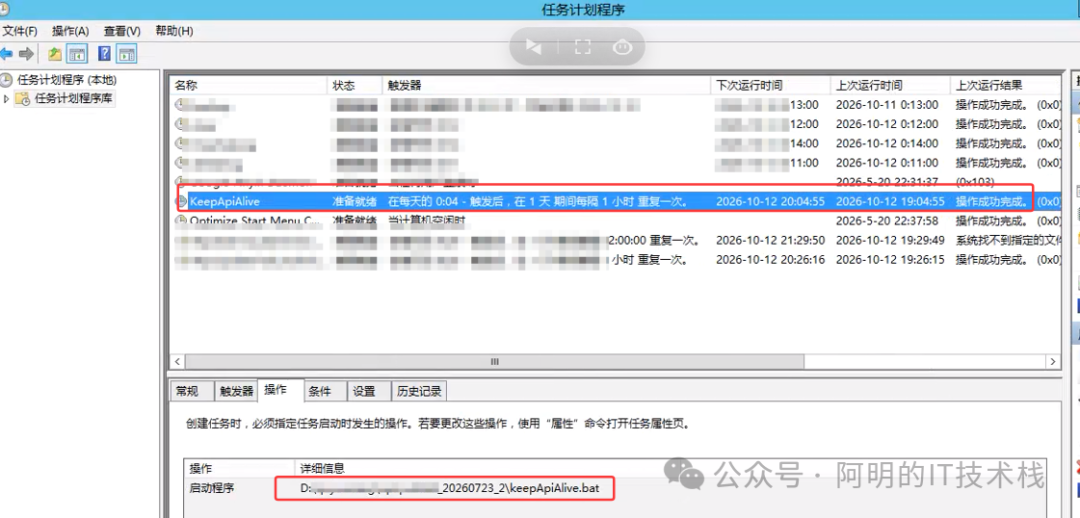
我在这里写了一个批处理文件
certutil -urlcache -split -f http://localhost:10001/ %temp%\dummy.tmp
命名为keepApiAlive.bat保存在磁盘上。
然后新建一个计划任务定期每间隔一个小时调用该批处理使网站保活。
阅读原文:点击这里
该文章在 2026/10/19 15:56:32 编辑过






 400 186 1886